



Error Handling
Error handling is a critical aspect of building robust distributed systems. Alokai provides an opinionated, type-safe error handling flow that connects your Alokai Middleware with frontend application.
This guide explains the complete error lifecycle, from throwing errors in the middleware to handling them gracefully in your Next.js application.
The Error Flow
Alokai implements a three-layer error handling architecture:
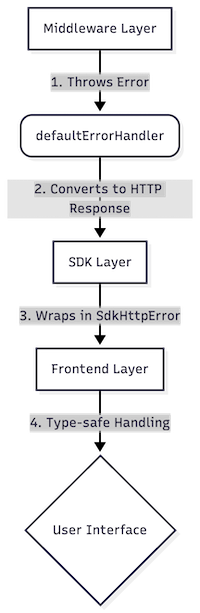
- Middleware Layer: You throw structured errors using
context.createHttpError()orHttpError. - Response Handling: The middleware's error handler converts these into standardized JSON responses.
- SDK Layer: The SDK automatically detects non-OK responses and wraps them in
SdkHttpError. - Frontend Layer: You use utility functions to identify error types and react accordingly.
Throwing Errors in Middleware
When developing custom methods or extensions, use the provided error utilities to ensure consistent behavior. Here's a quick example:
import { HttpStatusCode } from '@alokai/connect/middleware';

// Using context.createHttpError() — the preferred approach
throw context.createHttpError({
  statusCode: HttpStatusCode.BAD_REQUEST,
  message: 'Quantity must be greater than 0',
  data: { field: 'quantity', value: params.quantity }
});
For complete documentation on middleware error handling, including:
context.createHttpError()vsHttpErrordirect usage- Error adapters for HTTP clients (Axios, Apollo)
- When to use try/catch (and when to skip it)
- Validation errors with zod, valibot, and Standard Schema
- Consequences of not normalizing errors (circuit breaker issues, wrong status codes)
- Real-world examples from production integrations
See the Error Handling in Middleware guide.
Handling Errors on Frontend
The Alokai SDK wraps all middleware errors in SdkHttpError. To help you handle these errors safely, the SDK provides a set of type predicate functions.
Basic Error Handling
You can check if an error originates from the SDK using isCausedBySdkHttpError.
import { isCausedBySdkHttpError } from '@alokai/connect/sdk';

try {
  const product = await sdk.unified.getProduct({ id: '123' });
} catch (error) {
  if (isCausedBySdkHttpError(error)) {
    console.error(`API Error ${error.cause.statusCode}: ${error.cause.message}`);
    console.error(`Request URL: ${error.cause.url}`);
  }
}
Built-in Utility Functions
| Function | Purpose | Example Use Case |
|---|---|---|
isCausedBySdkHttpError | Checks if error is from SDK | General error logging |
isSpecificSdkHttpError | Checks for specific status code(s) | Handling 404 Not Found |
isSdkRequestError | Checks for 4xx errors (400-499) | Form validation feedback |
isSdkUnauthorizedError | Checks for 401 Unauthorized | Redirecting to login |
isSdkServerError | Checks for 5xx errors (500-599) | Showing maintenance page |
Common Patterns
Here are real-world examples of how to handle errors in your components.
Pattern 1: Form Validation (400 Bad Request)
When a user submits invalid data, you often want to show an inline error message.
import { isSpecificSdkHttpError } from '@alokai/connect/sdk';
import { useMutation } from '@tanstack/react-query';

export function RegisterForm() {
  const { error, mutate } = useMutation({
    mutationFn: registerUser
  });

  return (
    <form onSubmit={handleSubmit}>
      {isSpecificSdkHttpError(error, { statusCode: 400 }) && (
        <div className="error-alert">
          Please check your input and try again.
        </div>
      )}
      {/* ... fields ... */}
    </form>
  );
}
Pattern 2: Authentication Handling
For authentication errors, you might want to suppress global error notifications and handle them locally or redirect.
// app/[locale]/(auth)/login/components/login-form.tsx
import { isSdkUnauthorizedError } from '@alokai/connect/sdk';

// In your mutation
useMutation({
  meta: {
    // Skip global error toast for auth errors
    skipErrorNotification: isSdkUnauthorizedError,
  },
  mutationFn: loginUser,
});
Pattern 3: Resource Not Found (404)
For data fetching, handling 404s allows you to show "Empty State" components instead of crashing.
import { isSpecificSdkHttpError } from '@alokai/connect/sdk';

// Inside a component or hook
if (error && isSpecificSdkHttpError(error, { statusCode: 404 })) {
  return <ProductNotFound />;
}
Error Context and Metadata
You can pass additional structured data when throwing errors in the middleware. The frontend can then access it via the SDK error's cause:
if (isCausedBySdkHttpError(error) && error.cause.data?.errors) {
  logger.debug('Http Error', { error: error.cause });
  // Access structured validation errors
  const fieldErrors = error.cause.data.errors;
}
For details on how to structure error data on the middleware side, see Throwing Errors.
Integration with Next.js Error Handling
Alokai's error handling complements Next.js Error Handling.
- Use Alokai SDK Utilities for API interaction errors (forms, mutations, actions) where you want to stay on the same page and show feedback.
- Use Next.js
error.tsxfor unexpected runtime errors or when a page/component cannot render at all (e.g., during Server Side Rendering).
For Server Actions, avoid try/catch blocks when possible. Instead, return error objects and use useActionState to handle them in the UI, as recommended by Next.js.
See Also
- Error Handling Overview - Full guide on throwing and normalizing errors in middleware.
- Throwing Errors -
context.createHttpError(), error adapters, and domain errors. - When to Use try/catch - Decision guide for wrapping API calls.
- Real-World Examples - Production patterns you can copy.
- Custom Error Handlers - Customize the middleware's error response format.
- Logging - Configure error logging and monitoring integrations.