



Extending the Middleware
Extensions allow you to customize how the middleware and integrations run. You can add new API endpoints, hook into the request lifecycle, or modify the Express.js application itself.
Quick Start: Adding Custom API Methods
The most common use case is adding custom API methods. Every Alokai project includes a pre-configured custom extension for this purpose.
Define types in apps/storefront-middleware/api/custom-methods/types.ts:
export interface AddToWishlistArgs {
  productId: string;
  customerId: string;
}

export interface AddToWishlistResponse {
  wishlistId: string;
}
Implement your method in apps/storefront-middleware/api/custom-methods/addToWishlist.ts:
import { getLogger } from '@alokai/connect/middleware';
import type { IntegrationContext } from '@/types';
import type { AddToWishlistArgs, AddToWishlistResponse } from './types';

export async function addToWishlist(
  context: IntegrationContext,
  args: AddToWishlistArgs,
): Promise<AddToWishlistResponse> {
  const logger = getLogger(context);

  const { api } = await context.getApiClient();
  const result = await api.addProductToWishlist({
    customerId: args.customerId,
    product: { id: args.productId },
  });

  return { wishlistId: result.wishlistId };
}
Export your method in apps/storefront-middleware/api/custom-methods/index.ts:
export { addToWishlist } from '@/api/custom-methods/addToWishlist';
export * from '@/api/custom-methods/types';
Use it in your frontend:
const { wishlistId } = await sdk.customExtension.addToWishlist({
  productId: '123',
  customerId: 'customer-456',
});
Setting Up Custom Extension
If you don't have a custom extension configured yet in your project, see the Extension with API Methods section to learn how to create and register a new extension from scratch.
Working with the Context Object
Every custom method receives a context object as its first parameter:
| Property | Description |
|---|---|
getApiClient() | Access integration's API methods (e.g., const { api } = await context.getApiClient()) |
client | Underlying HTTP client (e.g., AxiosInstance) for custom requests |
config | Integration configuration (e.g., context.config.apiUrl) |
Example:
export async function getProductWithReviews(
  context: IntegrationContext,
  args: { productId: string }
) {
  // Use integration methods
  const { api } = await context.getApiClient();
  const product = await api.getProduct({ id: args.productId });

  // Make custom HTTP requests
  const reviews = await context.client.get(`/custom/reviews/${args.productId}`);

  return { product, reviews: reviews.data };
}
Using Normalizers
When working with the Unified Data Model, use normalizers to transform platform-specific data into the unified format:
import { getNormalizers } from '@vsf-enterprise/unified-api-sapcc';
import type { SapccIntegrationContext } from '@vsf-enterprise/sapcc-api';

export async function getProductWithReviews(
  context: SapccIntegrationContext,
  args: { productId: string }
) {
  const { normalizeProduct } = getNormalizers(context);

  const { api } = await context.getApiClient();
  const rawProduct = await api.getProduct({ id: args.productId });
  const product = normalizeProduct(rawProduct);

  return { product };
}
Learn More
For custom fields and advanced normalizer usage, see the Normalizers Guide.
Combining Multiple Data Sources
To combine data from multiple integrations (e.g., eCommerce + CMS), use context.getApiClient():
export async function getProductWithContent(
  context: IntegrationContext,
  args: { productId: string }
) {
  const [{ api }, contentful] = await Promise.all([
    context.getApiClient(),
    context.getApiClient('contentful'),
  ]);

  const [product, content] = await Promise.all([
    api.getProduct({ id: args.productId }),
    contentful.api.getEntries({ content_type: 'product', 'fields.sku': args.productId }),
  ]);

  return { product, content };
}
Data Federation Guide
For type-safe helpers and best practices, see the Data Federation Guide.
Advanced: Creating Custom Extensions
Beyond the built-in custom extension, you can create specialized extensions for caching, logging, or custom middleware behavior.
Using defineIntegrationExtension (Recommended)
Define a new extension using the defineIntegrationExtension factory function:
import { defineIntegrationExtension } from '@alokai/connect/integration-kit';
import type { SapccIntegrationContext } from '@vsf-enterprise/sapcc-api';

import * as methods from '@/api/custom-methods';

export const customExtension = defineIntegrationExtension<SapccIntegrationContext>()({
  extendApiMethods: methods,
  isNamespaced: true,
  name: 'custom',
});
Key features:
- Currying pattern -
defineIntegrationExtension<TContext>()({...})allows TypeScript to infer API method types while you explicitly provide the context type - Smart defaults -
namedefaults to'custom'andisNamespaceddefaults totrue - Direct property access - Unlike
ApiClientExtension, the return type allows direct access likecustomExtension.extendApiMethods.yourMethod
Basic Extension Example
Create extensions in apps/storefront-middleware/integrations/<integration-name>/extensions/:
Create the extension:
import { defineIntegrationExtension } from '@alokai/connect/integration-kit';
import type { SapccIntegrationContext } from '@vsf-enterprise/sapcc-api';

export const loggingExtension = defineIntegrationExtension<SapccIntegrationContext>()({
  name: 'logging',
  isNamespaced: false,
  extendApiMethods: {},
  hooks: (req, res, { logger }) => ({
    beforeCall({ callName, args }) {
      logger.info(`[${callName}] Request started`, { args });
      return args;
    },
    afterCall({ callName, response }) {
      logger.info(`[${callName}] Request completed`);
      return response;
    },
  }),
});
Export and register it:
export * from './logging';import { loggingExtension } from '@/integrations/commerce/extensions';
export const config = {
// ...
extensions: (extensions: ApiClientExtension[]) => [
...extensions,
loggingExtension,
],
} satisfies Integration<Config>;Extension with API Methods
To add new API endpoints via an extension, use extendApiMethods:
import { defineIntegrationExtension } from '@alokai/connect/integration-kit';
import type { SapccIntegrationContext } from '@vsf-enterprise/sapcc-api';

export const storeLocatorExtension = defineIntegrationExtension<SapccIntegrationContext>()({
  name: 'storeLocator',
  isNamespaced: true, // Creates /api/commerce/storeLocator/* endpoints
  extendApiMethods: {
    findNearbyStores: async (context, params: { lat: number; lng: number }) => {
      // ... implementation
      return { stores: [], total: 0 };
    },
    checkStoreStock: async (context, params: { storeId: string; sku: string }) => {
      // ... implementation
      return { available: true, quantity: 5 };
    },
  },
});
Using in the Frontend:
Export types in extensions/storeLocator/types.ts:
import type { WithoutContext } from '@alokai/connect/middleware';
import type { storeLocatorExtension } from './index';

export type StoreLocatorEndpoints = WithoutContext<typeof storeLocatorExtension['extendApiMethods']>;
Create SDK module in sdk/modules/store-locator.ts:
import { defineSdkModule } from '@vue-storefront/next';
import type { StoreLocatorEndpoints } from 'storefront-middleware/types';

export const storeLocator = defineSdkModule(({ buildModule, config, getRequestHeaders, middlewareModule }) =>
  buildModule(middlewareModule<StoreLocatorEndpoints>, {
    apiUrl: `${config.apiUrl}/commerce/storeLocator`,
    ssrApiUrl: `${config.ssrApiUrl}/commerce/storeLocator`,
    defaultRequestConfig: { headers: getRequestHeaders() },
  }),
);
Use it:
const { stores } = await sdk.storeLocator.findNearbyStores({ lat: 40.7128, lng: -74.0060 });Lifecycle Hooks
Extensions can hook into the request lifecycle at four key points:
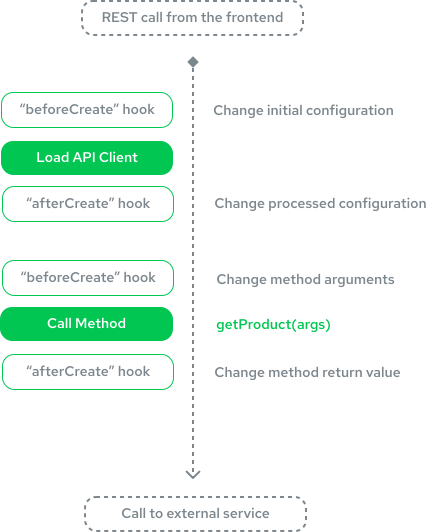
| Hook | When | Use For |
|---|---|---|
| beforeCreate | Once, before API client connection | Modify configuration, merge defaults |
| afterCreate | Once, after API client is created | Cleanup, log initialization |
| beforeCall | Before each API method call | Validate/transform arguments, add auth tokens |
| afterCall | After each API method call | Transform responses, set cache headers, log |
hooks receives (req, res, hooksContext) - req is the Express request (AlokaiRequest), so every handler can read req.cookies / req.header(...) / req.query from its closure. beforeCreate / afterCreate fire once at client creation (don't read per-request data there - req is stale). beforeCall / afterCall fire per request and must return modified values - mutating without returning is a silent no-op.
Real-World Examples
Attaching Context to Outgoing Platform Requests
Two patterns for shaping outgoing requests, side by side - pick by the value's lifetime, not by convenience. Mixing them up leaks data across concurrent requests.
A partner-affiliate extension is a natural fit: it tags every outgoing call with a static partner key that identifies the storefront to the platform (set once) and carries the per-request affiliate source from a cookie so the platform can attribute clicks and orders to the originating campaign (set every call).
import { defineIntegrationExtension } from '@alokai/connect/integration-kit';
import type { SapccIntegrationContext } from '@vsf-enterprise/sapcc-api';

export const partnerAffiliateExtension = defineIntegrationExtension<SapccIntegrationContext>()({
  name: 'partner-affiliate',
  isNamespaced: false,
  extendApiMethods: {},
  hooks: (req) => ({
    /**
     * beforeCreate - fires ONCE when the API client is created.
     * Use it for values that are identical for every request: partner keys,
     * User-Agent, static auth tokens, API version pins. `req` here is
     * stale; don't read it. The mutation lives on the shared HTTP client
     * and rides along on every subsequent call for free.
     */
    beforeCreate({ configuration }) {
      /**
       * Axios example - other integrations expose a different client surface
       * (fetch wrapper, vendor SDK, etc). Set the equivalent there.
       */
      configuration.client.defaults.headers['X-Partner-Key'] =
        process.env.SAPCC_PARTNER_KEY ?? '';
      return configuration;
    },

    /**
     * beforeCall - fires BEFORE EVERY API method call.
     * Use it for per-request values sourced from `req`: cookies, incoming
     * headers, query params, the current user. The affiliate source is
     * read fresh on every call and written onto the client right before
     * the outgoing HTTP request. Return args unchanged - the side effect
     * on the client is what carries the header out.
     */
    beforeCall({ args, configuration }) {
      const source = req.cookies['affiliate-source'];
      if (source && configuration) {
        configuration.client.defaults.headers['X-Affiliate-Source'] = source;
      }
      return args;
    },
  }),
});
Register via extensions: (extensions) => [...extensions, partnerAffiliateExtension] in the integration's config.ts.
This example uses axios because SAPCC uses axios
The hook signatures (beforeCreate, beforeCall, req closure, return-modified-args) are integration-agnostic. configuration.client is not - SAPCC exposes an AxiosInstance here, but other integrations expose different surfaces: Contentful ships a vendor SDK, Algolia uses its own client, others wrap fetch. Set the equivalent header/option on whichever client the integration uses.
Reusable Cache Extension
Create a configurable caching extension that works across integrations:
import type { ApiClientExtension } from '@alokai/connect/middleware';

export const createCacheControlExtension = (
  config: Record<string, string>
): ApiClientExtension => ({
  name: 'cache-control',
  isNamespaced: false,
  hooks(req, res) {
    return {
      afterCall({ response, callName }) {
        if (req.method === 'GET' && !res.getHeader('set-cookie') && callName in config) {
          res.set('Cache-Control', config[callName]);
        }
        return response;
      },
    };
  },
});
Usage:
import { createCacheControlExtension } from '@/integrations/common/extensions';

extensions: (extensions: ApiClientExtension[]) => [
  ...extensions,
  createCacheControlExtension({
    getProduct: 'public, max-age=3600',
    searchProducts: 'public, max-age=1800',
  }),
],
Custom Express Routes
Use extendApp to add custom routes to the Express application:
import { defineIntegrationExtension } from '@alokai/connect/integration-kit';

export const healthCheckExtension = defineIntegrationExtension()({
  name: 'health-check',
  isNamespaced: false,
  extendApiMethods: {},
  extendApp: ({ app }) => {
    app.get('/health', (req, res) => {
      res.json({ status: 'ok', timestamp: new Date().toISOString() });
    });
  },
});
Overriding Built-in API Methods
Extensions can override built-in integration methods for legacy compatibility or custom behavior. This is useful when an integration provides multiple API versions and you need to use older endpoints.
Use Case: SAP Commerce Cloud Smartedit Legacy Endpoints
SAP Commerce Cloud supports two types of Smartedit endpoints. Legacy SAPCC customers use getPage and getComponentsByIds, while newer implementations use getPageWithUser and getComponentsByIdsAndUser. The built-in Smartedit unified extension uses the newer methods by default.
To force the unified extension to use legacy endpoints, create a non-namespaced extension that overrides the newer methods:
import { defineIntegrationExtension } from '@alokai/connect/integration-kit';
import type { SmarteditIntegrationContext } from '@vsf-enterprise/smartedit-api';

export const legacyExtension = defineIntegrationExtension<SmarteditIntegrationContext>()({
  name: 'legacy',
  isNamespaced: false,
  extendApiMethods: {
    async getComponentsByIdsAndUser(context, ...params) {
      const { api } = await context.getApiClient();
      return api.getComponentsByIds(...params);
    },
    async getPageWithUser(context, ...params) {
      const { api } = await context.getApiClient();
      return api.getPage(...params);
    },
  },
});
Type Safety Required
When overriding built-in methods, always match the original method signature to avoid runtime errors. Using defineIntegrationExtension<IntegrationContext>() provides TypeScript compile-time verification that your override methods match the original contract.
Multi-Store Configuration
For dynamic configuration switching based on requests (e.g., path-based multi-store setups), see the Config Switcher Guide.
TypeScript Support
For full type safety and autocomplete support, use defineIntegrationExtension from @alokai/connect/integration-kit. This factory function provides automatic type inference for API methods while allowing you to specify the integration context type.
Using defineIntegrationExtension (Recommended)
The factory uses a currying pattern that allows TypeScript to infer your API method types automatically:
import { defineIntegrationExtension } from '@alokai/connect/integration-kit';
import type { SapccIntegrationContext } from '@vsf-enterprise/sapcc-api';

import { createPaymentAndPlaceOrder } from '@/api/checkout/createPaymentAndPlaceOrder';

export const checkoutExtension = defineIntegrationExtension<SapccIntegrationContext>()({
  name: 'checkout',
  isNamespaced: true,
  extendApiMethods: {
    createPaymentAndPlaceOrder,
  },
  hooks: (req, res, { logger }) => ({
    beforeCreate({ configuration }) {
      // configuration is properly typed as SapccIntegrationContext["config"]
      logger.info('Initializing checkout with API URL:', configuration.api);
      return configuration;
    },
  }),
});
Key differences from ApiClientExtension:
- Only requires one generic parameter (
TContext) instead of three - Configuration type is automatically extracted from
TContext["config"] - API methods type is inferred from
extendApiMethods - The
hooksfunction receives an additionalhooksContextparameter withlogger
Using Factory Functions for API Methods
You can pass a factory function to extendApiMethods that receives the integration context, useful when methods need access to configuration at definition time:
import { defineIntegrationExtension } from '@alokai/connect/integration-kit';

type CustomContext = { config: { apiUrl: string } };

export const apiExtension = defineIntegrationExtension<CustomContext>()({
  name: 'api',
  extendApiMethods: (context) => ({
    getApiUrl: async () => ({ url: context.config.apiUrl }),
  }),
});
Alternative: Using ApiClientExtension Directly
For cases where you need more control, you can still use ApiClientExtension with three generic parameters:
ApiClientExtension<Endpoints, IntegrationContext, Config>import type { ApiClientExtension } from '@alokai/connect/middleware';
import type {
ApiMethods,
MiddlewareConfig,
SapccIntegrationContext,
} from '@vsf-enterprise/sapcc-api';
export const checkoutExtension = {
name: 'checkout',
isNamespaced: true,
extendApiMethods: {
// ...methods
},
hooks(req, res) {
return {
beforeCreate({ configuration, logger }) {
logger.info('Initializing checkout with API URL:', configuration.api);
return configuration;
},
};
},
} satisfies ApiClientExtension<ApiMethods, SapccIntegrationContext, MiddlewareConfig>;Benefits
✅ With defineIntegrationExtension:
- Automatic API method type inference
- Direct property access on
extendApiMethods(e.g.,extension.extendApiMethods.yourMethod) - Simpler generic requirements (only
TContextneeded) - Access to
loggerin hooks viahooksContextparameter
✅ With Proper Generics (either approach):
- Full autocomplete for
configurationproperties in hooks - Type-safe
contextparameter inextendApiMethods - Catch configuration errors at compile time
❌ Without Type Information:
- No autocomplete support
- Runtime errors from typos in configuration access
- No validation of return types
API Reference
defineIntegrationExtension
Factory function for creating type-safe integration extensions.
Import:
import { defineIntegrationExtension } from '@alokai/connect/integration-kit';Signature:
defineIntegrationExtension<TContext>()({
  name?: string,           // Default: 'custom'
  isNamespaced?: boolean,  // Default: true
  extendApiMethods: TApiMethods | ((context: TContext) => TApiMethods),
  extendApp?: ExtendAppFunction,
  hooks?: (req, res, hooksContext) => HookHandlers,
}): IntegrationExtension<TApiMethods, TName, TIsNamespaced>
Parameters:
| Parameter | Type | Default | Description |
|---|---|---|---|
name | string | 'custom' | Unique identifier for the extension |
isNamespaced | boolean | true | If true, methods are at /{integration}/{extension}/{method} |
extendApiMethods | object | function | Required | API methods object or factory function receiving context |
extendApp | function | - | Receives Express.js app instance for adding routes/middleware |
hooks | function | - | Returns lifecycle hook handlers. Receives (req, res, hooksContext) |
Extension Properties (Legacy)
When using ApiClientExtension directly:
| Property | Type | Description |
|---|---|---|
name | string | Unique identifier for the extension |
isNamespaced | boolean | If true, methods are at /{integration}/{extension}/{method} (prevents collisions)If false (default), methods are at /{integration}/{method} |
extendApiMethods | object | Custom API methods. Each receives (context, params) and returns a Promise |
extendApp | function | Receives Express.js app instance for adding routes/middleware |
hooks | function | Returns lifecycle hook handlers. Receives (req, res) parameters |
Hook Parameters
When using defineIntegrationExtension, the hooks function receives three parameters:
req- The Express request object (AlokaiRequest)res- The Express response object (AlokaiResponse)hooksContext- Container with shared services includinglogger
All hook handlers receive these common parameters:
configuration- Integration configuration object (typed asTContext["config"])callName- Name of the API method being calledargs- Arguments array passed to the methodresponse- Response returned by the method (afterCall only)logger- Logger instance (use instead ofconsole.log)
Logging Best Practices
For structured logging, configuration, and best practices, see the Logging Guide.
Best Practices & Common Pitfalls
✅ Always Return from Hooks (Defensive Copy)
The framework reads the returned value. No return = silent no-op; mutating in place + returning the same reference = cross-request leaks. Always spread into a new array/object.
// ❌ no return - change dropped
beforeCall({ args }) { args[0].timestamp = Date.now(); }

// ❌ in-place mutation + return - leaks across requests
beforeCall({ args }) { args[0].timestamp = Date.now(); return args; }

// ✅ defensive copy + return
beforeCall({ args }) {
  const [first, ...rest] = args;
  return [{ ...(first ?? {}), timestamp: Date.now() }, ...rest];
}
✅ Use Namespacing to Prevent Collisions
// ⚠️ RISK: Might override existing methods
export const customExtension = defineIntegrationExtension()({
  name: 'custom',
  isNamespaced: false, // /commerce/getProduct - collision risk!
  extendApiMethods: {
    getProduct: async (context, params) => { /* ... */ },
  },
});

// ✅ SAFE: Separate namespace (default behavior)
export const customExtension = defineIntegrationExtension()({
  name: 'custom',
  // isNamespaced defaults to true: /commerce/custom/getProduct - no collision
  extendApiMethods: {
    getProduct: async (context, params) => { /* ... */ },
  },
});
✅ Keep Hooks Lightweight
Hooks run on every request - avoid expensive operations:
// ❌ BAD: Blocks every request
export const myExtension = defineIntegrationExtension()({
  name: 'my-extension',
  extendApiMethods: {},
  hooks: (req, res) => ({
    beforeCall({ args }) {
      const data = expensiveSyncOperation(); // Runs on every request!
      return args;
    },
  }),
});

// ✅ GOOD: One-time setup
export const myExtension = defineIntegrationExtension()({
  name: 'my-extension',
  extendApiMethods: {},
  hooks: (req, res) => ({
    beforeCreate({ configuration }) {
      configuration.cachedData = expensiveOperation(); // Runs only once
      return configuration;
    },
  }),
});
✅ Parallelize Data Federation
// ❌ Sequential: 600ms total
const commerceApi = await commerce.getApiClient();
const product = await commerceApi.api.getProduct({ id });
const cmsApi = await cms.getApiClient();
const content = await cmsApi.api.getContent({ sku: id });

// ✅ Parallel: 300ms total
const [commerceApi, cmsApi] = await Promise.all([
  commerce.getApiClient(),
  cms.getApiClient(),
]);
const [product, content] = await Promise.all([
  commerceApi.api.getProduct({ id }),
  cmsApi.api.getContent({ sku: id }),
]);
✅ Use Type Safety
import { defineIntegrationExtension } from '@alokai/connect/integration-kit';
import type { SapccIntegrationContext } from '@vsf-enterprise/sapcc-api';

// Recommended: Use defineIntegrationExtension for automatic type inference
export const myExtension = defineIntegrationExtension<SapccIntegrationContext>()({
  name: 'my-extension',
  extendApiMethods: {
    // Methods are automatically typed
  },
});
✅ Use Structured Logging
Always use the logger parameter instead of console.log for proper log aggregation and filtering.