



PKCE authentication
Recent SAP Commerce Cloud versions replace the Resource Owner Password Credentials (ROPC) flow with the OAuth 2.0 Authorization Code flow with PKCE for customer login. The Alokai integration supports PKCE out of the box, without any changes to your storefront code or to the Unified Data Layer contract.
This page explains how the default, server-side PKCE flow works, what trade-off it makes, how to configure your OAuth client for it, and how to implement the standard browser-redirect flow if your security policy requires it.
Why the flow changed
SAP has deprecated ROPC (grant_type=password), and new SAP Commerce Cloud instances only issue customer tokens through the Authorization Code flow with PKCE. The standard PKCE flow is redirect-based: the browser navigates to a login page hosted by the SAP authorization server, and comes back with a single-use authorization code that gets exchanged for a token.
This doesn't fit the Unified Data Layer contract. The unified loginCustomer and logoutCustomer methods accept credentials as arguments and return a result in the same request - they assume a direct credentials exchange, not a chain of browser redirects. To keep Unified working as the default for SAP Commerce Cloud, the integration performs the PKCE flow differently than the standard way: entirely on the server side.
Application token vs. customer token
The integration works with two different tokens, and the PKCE change affects only one of them. Being precise about which is which resolves most of the confusion around OAuth client configuration.
The application token authenticates the application itself (Alokai Middleware), not any person. The customer token (the "auth token" stored in the vsf-sap-token cookie) authenticates one logged-in customer.
| Application token | Customer token | |
|---|---|---|
| Represents | The middleware application | A single logged-in customer |
| OAuth flow | Client Credentials (grant_type=client_credentials) | Authorization Code + PKCE (previously ROPC) |
| Requires | Confidential client with client_id + client_secret | Client with the authorization_code grant |
| Scope | One shared token for the whole middleware instance | One access + refresh token pair per customer session |
| Lifecycle | Requested at middleware startup, refreshed on 401 | Issued at login, refreshed with refresh_token, revoked on logout |
| Where it lives | Only in middleware memory | In the browser, as the HttpOnly vsf-sap-token cookie |
| Sent to the browser | Never | Yes (as an unreadable HttpOnly cookie) |
| Affected by the PKCE change | No | Yes - only how it's obtained changed |
For every OCC call, the middleware decides which token to attach based on the method's token mode: customer, application, customerOrApplication (customer token if the user is logged in, application token otherwise), or none (anonymous request). For example, getProduct uses the application token, getUserOrderHistory uses the customer token, and getCart uses whichever is available. You can override these defaults per method with the methodsTokenModes property in the middleware config.
The PKCE migration changes nothing about the application token or the token modes. It only changes the handshake the middleware performs to obtain the customer token at login.
How the default flow works
When a customer logs in, the storefront still calls loginCustomer with the email and password, exactly as before. The Alokai Middleware then performs the whole PKCE handshake with the SAP authorization server on the customer's behalf: it generates the code_verifier and code_challenge pair, loads the SAP-hosted login page, submits the customer's credentials to it, and exchanges the returned single-use authorization code for the customer token.
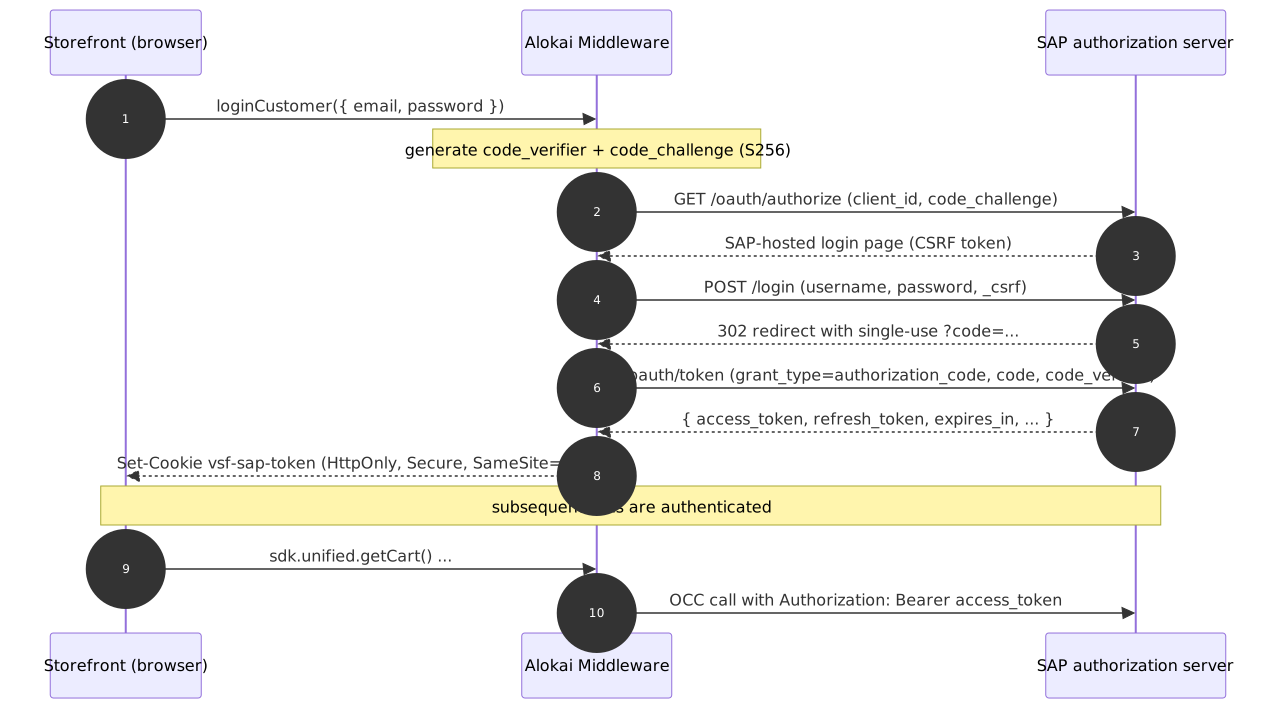
There are no browser redirects and no SAP-hosted pages shown to the user. The login form, the cookies (vsf-sap-token with HttpOnly, Secure, SameSite: Strict), and the session management behavior (token refresh, revocation on logout) are identical to the previous flow.
The trade-off
The customer's credentials pass through the Alokai Middleware. They are sent over TLS, used only to submit the SAP login form, and are never stored or logged - but they do transit a system other than the SAP authorization server. This is the same characteristic the ROPC flow always had, so for most projects nothing changes.
The standard, redirect-based PKCE flow avoids this entirely: the user types their password only into the SAP-hosted login page. If your security policy requires that, implement the browser-redirect flow described below.
Configuration
During startup, the middleware probes the /oauth/authorize endpoint of your SAP instance to detect whether it supports PKCE. If it does, customer login automatically uses the server-side PKCE flow; otherwise it falls back to ROPC.
You can skip the startup auto-detection by setting pkceSupported explicitly in the OAuth section of your integration config:
export const config = {
  configuration: {
    // ...
    OAuth: {
      clientId: process.env.SAPCC_OAUTH_CLIENT_ID,
      clientSecret: process.env.SAPCC_OAUTH_CLIENT_SECRET,
      pkceSupported: true,
      tokenEndpoint: process.env.SAPCC_OAUTH_TOKEN_ENDPOINT,
      tokenRevokeEndpoint: process.env.SAPCC_OAUTH_TOKEN_REVOKE_ENDPOINT,
      uri: process.env.SAPCC_OAUTH_URI,
    },
  },
  // ...
} satisfies Integration<Config>;
Setting pkceSupported explicitly is recommended for production. It removes one network round trip from the middleware startup and protects you from a failed probe (for example, a network hiccup) silently switching customer login back to ROPC.
If your OAuth client has more than one redirect URI registered, the authorization server requires an explicit redirect_uri parameter. Set it with the optional redirectUri property in the same OAuth section.
OAuth client requirements
Because the middleware obtains both tokens with the same OAuth client, that client must have both grant types enabled:
client_credentials- for the application token,authorization_code- for the customer token (PKCE login).
Two concerns come up frequently here, and both are worth addressing directly.
"Isn't a client with both grants too privileged?"
No, because this client is configured only in the middleware. Its ID and secret live in server-side environment variables and are never shipped to the browser. From the frontend's perspective, nothing changed: the browser only ever talks to the Alokai Middleware and receives an HttpOnly cookie it cannot even read.
A frontend-side OAuth client only enters the picture if you implement the browser-redirect flow. In that case you register a separate public client for the browser with only the authorization_code grant, and the confidential client with client_credentials stays in the middleware.
"Is client_credentials still needed at all?"
Yes. PKCE replaced only the flow that obtains the customer token. The application token is still obtained through the Client Credentials flow, and it's still required: it authenticates all anonymous traffic (product listings, categories, search) as well as trusted-client endpoints - OCC endpoints that reject anonymous requests outright. Promotions and vouchers are the most common examples.
You can verify this against your own instance:
# Anonymous request - rejected with 401
curl "https://{your-sap-api}/occ/v2/{baseSiteId}/promotions?type=all"

# Same request with an application token - accepted with 200
TOKEN=$(curl -X POST "https://{your-sap-api}/authorizationserver/oauth/token" \
  -d "grant_type=client_credentials" -d "client_id={clientId}" \
  --data-urlencode "client_secret={clientSecret}" | jq -r .access_token)
curl -H "Authorization: Bearer $TOKEN" \
  "https://{your-sap-api}/occ/v2/{baseSiteId}/promotions?type=all"
Removing the client_credentials grant from the middleware client would break these endpoints for every visitor, logged in or not.
Implementing the standard browser-redirect flow
If your security policy doesn't allow customer credentials to pass through the Alokai Middleware, you can implement the standard PKCE flow with browser redirects instead: the browser generates the verifier/challenge pair, the user authenticates directly on the SAP-hosted login page, and the authorization server redirects back to a storefront callback page with a single-use ?code= parameter. A custom middleware method then exchanges the code for the customer token - neither the storefront nor the middleware ever sees the password.
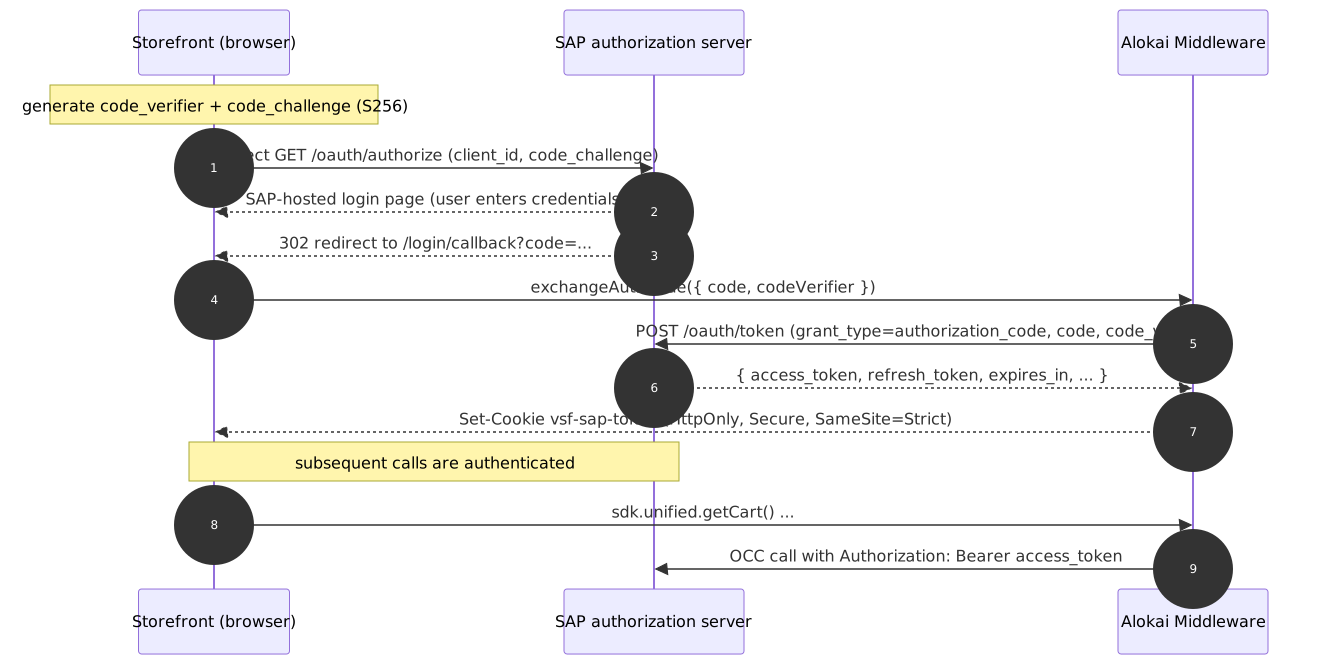
Only the login entry point changes. Because the exchange stores the token in the same vsf-sap-token and vsf-user cookies the default flow uses, everything downstream - token refresh, logoutCustomer, the rest of session management - keeps working.
The code below shows the essential shape of each piece; adapt error handling, styling, and translations to your project.
Register a public OAuth client for the browser
In SAP Commerce Backoffice, create a dedicated OAuth client for the storefront with:
- only the
authorization_codegrant type (noclient_credentials), - no client secret (a public client - the browser cannot keep a secret),
- your storefront callback registered as a redirect URI, for example
https://my-storefront.example.com/login/callback.
Keep your existing confidential client (with client_credentials) configured in the middleware - it's still required for the application token, as explained above.
If the client has exactly one redirect URI registered, the SAP authorization server uses it automatically and the redirect_uri parameter can be omitted from both the authorization and token requests. If you register more than one, you must pass the same redirect_uri in both requests.
Add the exchangeAuthCode custom method
Create a custom middleware method that exchanges the authorization code for a customer token and stores it in the standard auth cookies:
import { axiosAdapter } from '@alokai/middleware-axios-error-adapter';
import {
  AUTH_USER_COOKIE_NAME,
  AUTH_USER_TOKEN_COOKIE_NAME,
  AUTHENTICATED_USER,
} from '@vsf-enterprise/sapcc-api';
import axios from 'axios';

import type { IntegrationContext } from '@/types';

interface ExchangeAuthCodeArgs {
  code: string;
  codeVerifier: string;
  redirectUri?: string;
}

const { SAPCC_PKCE_OAUTH_CLIENT_ID } = process.env;

export async function exchangeAuthCode(context: IntegrationContext, args: ExchangeAuthCodeArgs) {
  const { code, codeVerifier, redirectUri } = args;
  const { tokenEndpoint, uri } = context.config.OAuth;

  const params = new URLSearchParams({
    client_id: SAPCC_PKCE_OAUTH_CLIENT_ID!,
    code,
    code_verifier: codeVerifier,
    grant_type: 'authorization_code',
  });
  if (redirectUri) params.set('redirect_uri', redirectUri);

  // The normalizer turns OAuth error responses into middleware HTTP errors
  const oauthClient = axiosAdapter.withErrorNormalizer(axios.create({ baseURL: uri }));
  const { data: token } = await oauthClient.post(tokenEndpoint, params);

  const cookieOptions = { httpOnly: true, sameSite: 'strict', secure: true } as const;
  context.res.cookie(AUTH_USER_TOKEN_COOKIE_NAME, JSON.stringify(token), cookieOptions);
  context.res.cookie(AUTH_USER_COOKIE_NAME, AUTHENTICATED_USER, cookieOptions);

  return { isLoggedIn: true };
}
In a production implementation, also validate args (throw a 422 via context.createHttpError when code or codeVerifier is missing) and merge the per-cookie overrides from context.config.OAuth.cookieOptions into the cookie options, as the default auth extension does.
Start the login with a redirect
Replace the credentials form with a button that generates the PKCE pair, stores the verifier for the callback, and navigates to the SAP-hosted login page:
import { env } from '@vue-storefront/next';

export async function startPkceLogin(): Promise<void> {
  // A PKCE code verifier must be 43-128 chars; two UUIDs give 72 safe chars
  const codeVerifier = crypto.randomUUID() + crypto.randomUUID();
  sessionStorage.setItem('vsf-pkce-code-verifier', codeVerifier);

  const digest = await crypto.subtle.digest('SHA-256', new TextEncoder().encode(codeVerifier));
  const codeChallenge = btoa(String.fromCharCode(...new Uint8Array(digest)))
    .replace(/\+/g, '-')
    .replace(/\//g, '_')
    .replace(/=+$/, '');

  const authorizeUrl = new URL('oauth/authorize', env('NEXT_PUBLIC_SAPCC_OAUTH_URI'));
  authorizeUrl.search = new URLSearchParams({
    client_id: env('NEXT_PUBLIC_SAPCC_OAUTH_CLIENT_ID'),
    code_challenge: codeChallenge,
    code_challenge_method: 'S256',
    response_type: 'code',
    // add redirect_uri here if your OAuth client requires it
  }).toString();

  window.location.assign(authorizeUrl.toString());
}
Add the callback page
The authorization server redirects back to /login/callback?code=.... The callback page reads the code and the stored verifier, calls exchangeAuthCode, and redirects to the account page:
'use client';

import { useSearchParams } from 'next/navigation';
import { useEffect, useRef } from 'react';

import { useRouter } from '@/config/navigation';
import { useSdk } from '@/sdk/alokai-context';

export default function LoginCallbackPage() {
  const sdk = useSdk();
  const router = useRouter();
  const searchParams = useSearchParams();
  const didExchange = useRef(false);

  // The authorization code is single-use, so the exchange must not run
  // again on a React strict-mode re-mount.
  useEffect(() => {
    if (didExchange.current) return;
    didExchange.current = true;

    const code = searchParams.get('code');
    const codeVerifier = sessionStorage.getItem('vsf-pkce-code-verifier');
    sessionStorage.removeItem('vsf-pkce-code-verifier');

    if (!code || !codeVerifier) return; // show an error state instead

    sdk.customExtension
      .exchangeAuthCode({ code, codeVerifier })
      .then(() => router.push('/my-account/personal-data'));
  }, []);

  return <Loader />;
}
If you cache customer data with a client-side query library, invalidate it after the exchange so the storefront picks up the logged-in state.
Set the environment variables
# Storefront: authorization server URL and the public client id
NEXT_PUBLIC_SAPCC_OAUTH_URI=https://{your-sap-api}/authorizationserver/
NEXT_PUBLIC_SAPCC_OAUTH_CLIENT_ID={public-client-id}

# Middleware: the same public client, used by exchangeAuthCode
SAPCC_PKCE_OAUTH_CLIENT_ID={public-client-id}
Verify the flow
Open the login page and click the login button - you should land on the SAP-hosted login page. After entering valid credentials, you should be redirected back to /login/callback and end up on the account page as a logged-in customer, with the vsf-sap-token cookie set by the exchangeAuthCode response.
Choosing between the two flows
Use the default server-side flow unless you have a specific reason not to. It requires zero storefront changes, keeps the native login form UX, and works with the Unified Data Layer out of the box.
Switch to the browser-redirect flow when your security policy requires that customer credentials are entered only on SAP's own login page, or when you want to reuse SAP-side login features such as a customized login page.