



Defining features
The feature model - views, URLs, version history, and in-panel guides.
Everything in the panel starts with a feature: one area of your app that your team administers, declared with defineFeature and registered on the integration's configuration.features. A feature groups views - each view is one screen in the panel, one sidebar entry, and one URL.
All authoring imports come from a single entry point, @alokai/connect-admin/server. Here's a whole feature with two views - a form and a workflows view:
import { defineFeature } from '@alokai/connect-admin/server';

import { refreshBannerCache } from './banner-cache';

export const siteBanner = defineFeature({
  enabled: true,
  id: 'site-banner',
  name: 'Site banner',
  views: [
    {
      defaults: {
        banner: { headline: 'Free shipping this week', showBanner: true, tone: 'info' },
      },
      description: 'The strip shown at the top of every page.',
      id: 'banner',
      kind: 'form',
      label: 'Banner',
      schemas: {
        banner: {
          fields: [
            { kind: 'boolean', label: 'Show the banner', name: 'showBanner' },
            { kind: 'text', label: 'Headline', name: 'headline', required: true },
            {
              kind: 'select',
              label: 'Tone',
              name: 'tone',
              options: () => [
                { label: 'Information', value: 'info' },
                { label: 'Warning', value: 'warning' },
              ],
            },
          ],
        },
      },
    },
    {
      description: 'Jobs related to the banner.',
      id: 'banner-jobs',
      kind: 'workflows',
      label: 'Jobs',
      workflows: [
        {
          description: 'Drop the cached banner so storefronts pick up changes right away.',
          id: 'refresh-cache',
          label: 'Refresh the banner cache',
          steps: [
            {
              id: 'refresh',
              kind: 'task',
              label: 'Refresh',
              run: async (context, wf) => {
                const cleared = await refreshBannerCache(context);
                wf.log.info(`Cleared ${cleared} cache entries`);
                return { cleared };
              },
            },
          ],
        },
      ],
    },
  ],
});
That's two sidebar entries under one heading, served at /connect-admin/banner and /connect-admin/banner-jobs. refreshBannerCache is your own code: workflow steps run on the server, so they can reach anything your middleware can. The rest of this page explains each part.
FeatureDefinition
defineFeature is a types-only helper: it returns the object unchanged, so your editor checks the definition where you write it.
| Property | Type | What it does |
|---|---|---|
id | string | Unique across all registered features. Registration throws on a duplicate. |
name | string | The heading shown in the panel's sidebar. |
description | string? | A note for your own team. The panel doesn't show it anywhere today - the sub-text readers see under a screen's title is the view-level description. |
enabled | boolean | (context) => boolean | Whether the feature exists right now. See below. |
views | FeatureView[] | The screens, in sidebar order. The first view of the first feature is the panel's landing page. |
initialVersions | InitialConfigVersion[]? | Seed versions for the feature's history. See below. |
enabled - a switch or a predicate
enabled can be a plain boolean, or a function that receives the request context - and the function runs on every catalog request, so it can react to env vars, tenants, or anything else in the context:
enabled: () => process.env.MY_FEATURE_ROLLOUT === 'true',A disabled feature disappears from the panel's sidebar, and getFormValues for its views returns the code baseline instead of anything saved in the store. The baseline is the initialVersions entry marked live when the feature declares initialVersions (see below), and the views' merged defaults when it doesn't. Saved versions, a versionId you pass in, and any preview marker are all ignored, so the read is the same every time. It never errors - a disabled feature reads as "the values the code ships with".
Views
FeatureView is a union of view kinds, and each kind has its own page:
kind | Screen | Documented in |
|---|---|---|
'form' | An editable, validated, versioned form | Forms |
'workflows' | Multi-step server-side jobs with review gates | Workflows |
Every view shares the same base properties: id, label, an optional description, and an optional guide (see below).
View URLs and id pairs
Each view is served at /connect-admin/<viewId>. View ids only have to be unique within one feature. If a second feature reuses an id, the first feature keeps the short path and the second one is qualified with its feature id:
/connect-admin/configuration            → the first feature declaring it
/connect-admin/search.configuration     → the "search" feature's view
getFormValues resolves ids the same way, with one twist: it only looks at kind: 'form' views, so a workflows view never claims a read even when it owns the short URL. Pass featureId to name the second feature explicitly. When two features declare the same id as a form view, a bare read answers from the first one and logs a warning, so the ambiguity shows up in your logs rather than in wrong data.
Version history is per feature
A feature owns one version history, shared by all of its views. If a feature has two form views, saving in either one adds to the same timeline, and a version's data holds both views' values (keyed by their schema keys). Plan your feature boundaries around this: two areas that should version independently should be two features.
Seeding with initialVersions
Without initialVersions, a feature starts with a single v1 live version built from the views' merged defaults. With it, you control the starting history:
initialVersions: [
  { data: { banner: { headline: 'Summer sale', showBanner: true } }, label: 'Summer', status: 'live' },
  { data: { banner: { headline: 'Plain fallback', showBanner: false } }, label: 'Fallback' },
],datamirrorsschemas- one key per schema key, across every form view of the feature. Singleton schemas hold an object; multi schemas hold an array.- Exactly one entry should be
status: 'live'; if none is marked, the first one is. - On later deploys, the live version is re-seeded from the code only when the code baseline actually changed. Versions people saved, and any work in progress, are always preserved.
In-panel guides
Any view can carry a guide - written instructions that open in a panel on the right when someone clicks the Guide button in the header. This is where operator instructions belong: the guide sits in the same file as the schema, so it can't drift from what the screen actually shows.
guide is a property of the view, next to id, kind, and label - so each view brings its own instructions:
{
  id: 'settings-native',
  kind: 'form',
  label: 'Configuration (native renderer)',
  description: 'Every native field kind, in one reference form.',
  defaults: { /* ... */ },
  schemas: { /* ... */ },
  guide: {
    title: 'Field types',
    chapters: [
      {
        title: 'Overview',
        doc: 'Every control the editor supports, on one page. Use it as a reference when deciding how to shape a new field, and as a check that a control behaves the way you expect before you rely on it.\n\nEach section below covers one family of fields: what it is for, how it reads, and where it is easy to get wrong.',
      },
      // ...nine more chapters, one per family of fields
    ],
  },
}
Here's exactly that guide open in the panel. The Guide button in the header opens it, the guide's title heads the drawer, and the first chapter's title and doc are what you read below it:
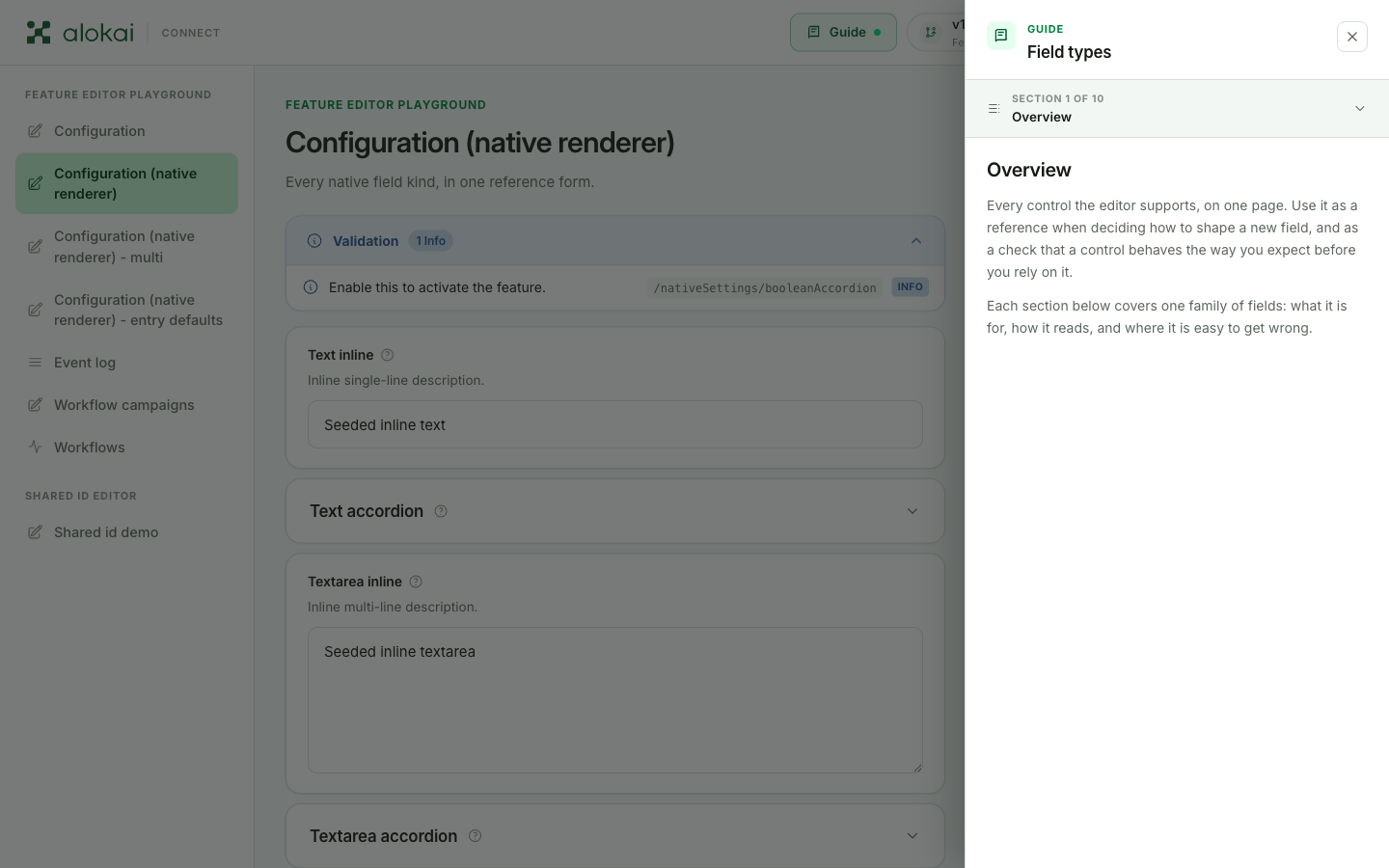
Chapters are the unit of navigation: the panel shows one at a time, in the order declared, and the section header at the top ("Section 1 of 10" above) unfolds into a contents list for jumping between them.
The doc field is markdown, and most of it is supported: headings, lists, quotes, fenced code, rules, inline emphasis and links, and images - the panel enlarges an image when the reader clicks it. Use images for anything easier shown than told, like annotated screenshots of the form itself.
Two small behaviors to know: the guide's title is optional - when it's missing, the panel uses the view's label - and a guide with no chapters shows no Guide button at all.
Registering features
A feature exists once it's listed in configuration.features of the Connect Admin integration config. Import it and add it to the list:
import { defineConfig } from '@alokai/connect-admin/server';

import { siteBanner } from './features/site-banner';
import { searchTuning } from './features/search-tuning';

export const config = defineConfig({
  configuration: {
    features: [siteBanner, searchTuning],
  },
  location: '@alokai/connect-admin/server',
});
One file per feature and this list is all the structure you need. Registration runs at middleware boot.
Duplicate feature ids stop the boot
Registration throws when two features share an id, and the message names the id. That's deliberate: with two features answering to the same id, every getFormValues read and every URL would be a coin toss.