



Workflows
Multi-step server-side jobs with review gates, run by hand or from a webhook.
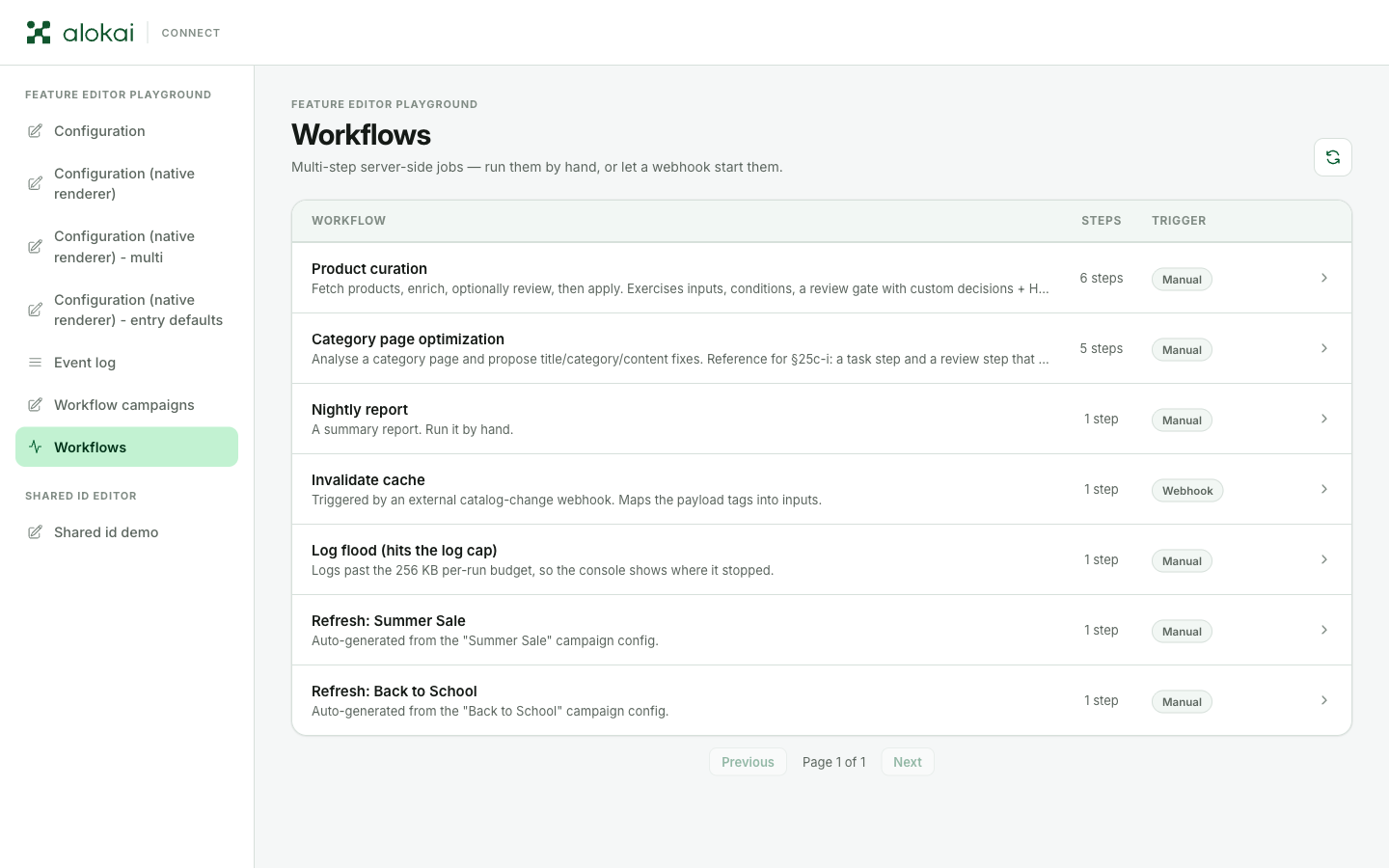
A kind: 'workflows' view lists jobs that run on the server in steps - with live progress, logs, and optional review gates where a person approves or rejects before the job continues. A run starts in one of two ways: a person clicks Run workflow in the panel, or an external system calls the workflow's webhook.
Defining workflows
Two names, two things. The WorkflowsView is a view like any other - it goes into the views of a feature. Each element of its workflows array is one WorkflowDefinition, and that's what the table describes.
import { defineFeature } from '@alokai/connect-admin/server';

export const pricing = defineFeature({
  enabled: true,
  id: 'pricing',
  name: 'Pricing',
  views: [
    {
      id: 'workflows',
      kind: 'workflows',
      label: 'Workflows',
      workflows: [
        {
          id: 'import-prices',
          label: 'Import price list',
          description: 'Fetch, summarize, apply after approval.',
          concurrency: 'single',
          inputs: { fields: [{ kind: 'text', label: 'Source URL', name: 'url', required: true }] },
          steps: [ /* the Steps chapter below fills this in */ ],
        },
      ],
    },
  ],
});
Like every feature, pricing then has to be listed in the module's configuration.features - see Registering features.
| Property | What it does |
|---|---|
id | Unique within the view, and stable - run history and webhooks key off it. |
label, description | What the panel shows. |
steps | The step list, executed in order. |
inputs | An optional small form the panel shows before starting; values arrive in each step as workflowContext.input. Only the plain field kinds - see Run inputs. |
concurrency | 'parallel' (default) or 'single' - see below. |
hidden | Not listed in the panel and can't be started by hand; pair it with a webhook for machine-triggered jobs. |
webhook | The HTTP trigger - see below. |
Static workflow lists are validated at boot, and a bad definition fails loudly. The check catches: no steps, a duplicate workflow id inside one view, duplicate step or decision ids, a run input using a kind that isn't allowed, a review step nested inside a decision branch's steps, a hidden workflow with a review step, and a production webhook with no secret.
Run inputs
inputs is the small box the panel shows before Run workflow. It takes a small, fixed set of field kinds - roughly what GitHub Actions offers, plus picking several options from a fixed list:
| Allowed | Not allowed |
|---|---|
text, textarea, number | object, map, array |
boolean, toggle | stringList, tagList, sentenceRule |
select, multiSelect, multiSelectDropdown |
A wrong kind is a TypeScript error where you write it. Configs written by hand and workflows built by a resolver skip that check, so the same rule is enforced again while the app is up.
Anything richer than this belongs in a form view that the workflow reads with getFormValues - which is also how a form can drive which workflows exist in the first place.
Steps
steps is the heart of a WorkflowDefinition: an ordered list executed top to bottom, where each entry is either a task (code) or a review (a person).
Task steps
A task step is server-side code. Here's the first entry of the steps array from the definition above:
import type { CommerceEndpoints } from '@/types';

// inside `steps: [...]` of the import-prices workflow
{
  id: 'fetch',
  kind: 'task',
  label: 'Fetch and check the price list',
  timeoutMs: 60_000, // default 15 minutes
  run: async (context, wf) => {
    wf.log.info('Fetching…', { url: wf.input.url });
    const rows = await fetchRows(String(wf.input.url), { signal: wf.signal });

    // `context` is the same middleware context your API methods get -
    // here it reaches the SAP Commerce Cloud integration:
    const { api: commerce } = await context.getApiClient<CommerceEndpoints>('commerce');
    const { data: product } = await commerce.getProduct({ productCode: rows[0].sku });
    wf.log.info(`Prices arrive for products like ${product.name}`);

    return { count: rows.length }; // becomes wf.outputs['fetch']
  },
},(fetchRows stands for your own code.) That context is the point of the whole feature: a step can call anything your server middleware can. getApiClient reaches every integration registered in middleware.config.ts - the commerce backend above, a CMS, search, your own extensions. The one thing a step must never touch is context.res: steps run detached, after the HTTP response that started them has already ended.
A task can also carry condition - a callback that skips the step when it returns false (a throw fails the run, only false skips).
By default the run drawer shows a task's result as raw JSON. Add renderOutput to present it as simple HTML you render server-side - a readable table instead of an object dump - sandboxed the same way as a review's htmlView below.
What every callback receives
Every step callback - run, condition, present, renderOutput - gets two arguments: the middleware context above, and this workflowContext:
| Field | What it is |
|---|---|
input | The values from inputs (or the webhook's mapped payload). |
log | debug/info/warn/error(message, data?) - this is what the operator watches live. |
outputs | Results of earlier steps, keyed by step id. Typed Record<string, unknown>, so cast what you read - as the sample above does. |
signal | An AbortSignal that fires on cancel or timeout. Pass it to your I/O - a step that ignores it can't be cancelled. |
trigger | 'manual' or 'webhook'. |
runId, workflowId | Identifiers, useful in logs. |
A throwing step fails the run; so does exceeding the step timeout. A step's return value is persisted, and a value over 256 KB fails the step rather than being truncated - return identifiers and re-fetch bulk data instead of returning it.
Review steps
A review step parks the run and waits for a person. present builds what they see; decisions are the buttons they choose from. A later entry of the same steps array:
// inside `steps: [...]`, after the tasks that prepared the change
{
  id: 'approve',
  kind: 'review',
  label: 'Approve the change',
  present: (context, wf) => ({
    title: 'Apply these prices?',
    summary: `${(wf.outputs.fetch as { count: number }).count} rows will change.`,
    data: wf.outputs.fetch,
    htmlView: { html: renderPriceTable(wf.outputs.fetch) },
  }),
  decisions: [
    { id: 'apply', label: 'Apply', variant: 'primary' },
    { id: 'stop', label: 'Reject', outcome: 'stop', variant: 'danger' },
  ],
},
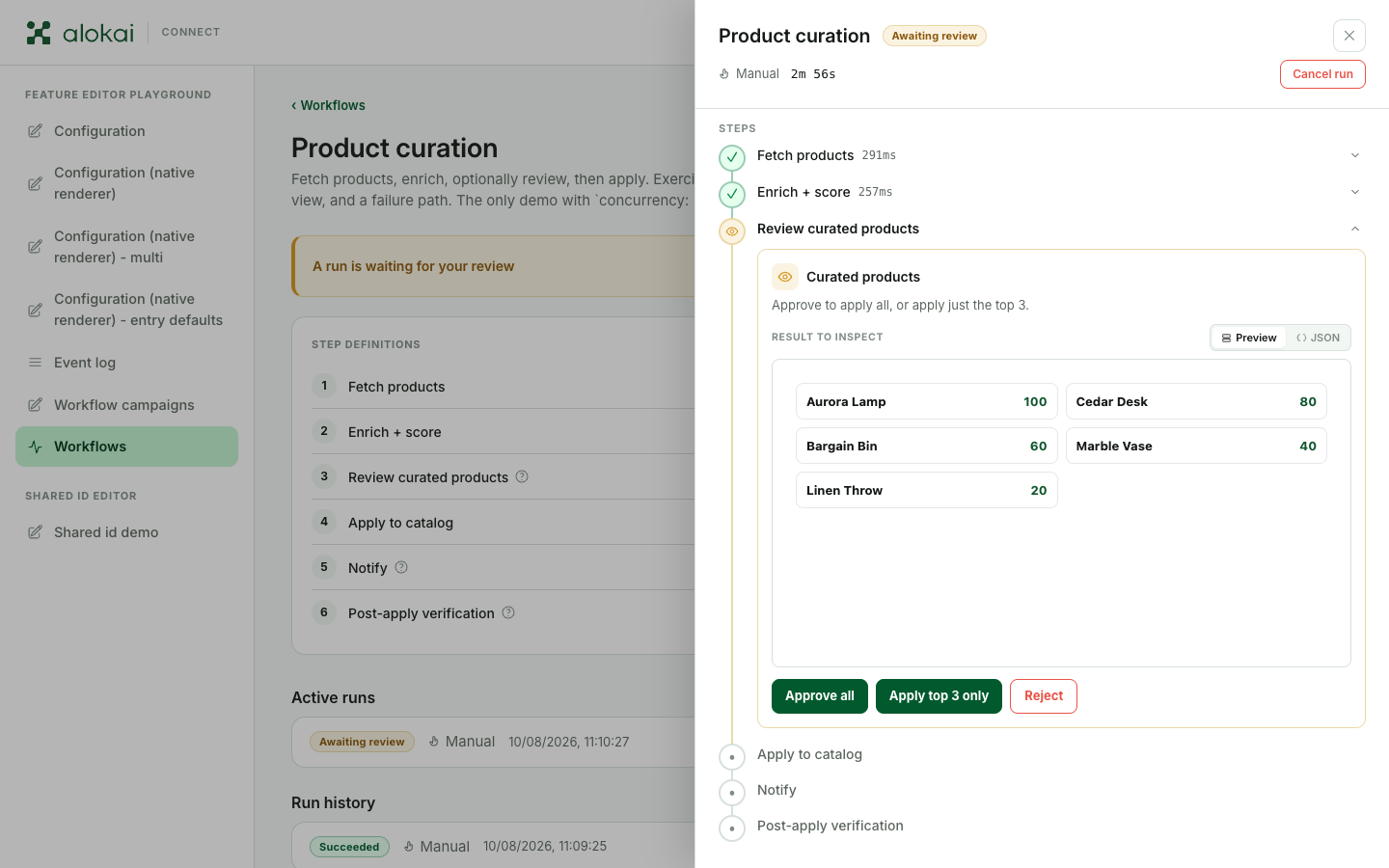
Here's a run parked at a review gate - the presentation built by present, the Preview / JSON switch, and the decision buttons under it:
- Omitting
decisionsgives a default Approve/Reject pair. outcome: 'stop'ends the run asrejected- a decision, not a failure.- A decision can carry its own
steps: task steps that run only when that decision is taken, which is how you branch. htmlView: { html }is how you show reviewers something nicer than JSON - simple HTML you render server-side from the step outputs, likerenderPriceTableabove. The drawer renders it inside a sandboxed frame, so scripts inside it never run - even if platform or LLM content includes a<script>tag. Nothing in the frame can reach the panel, and relative URLs won't load.datais shown as raw JSON - with a Preview / JSON switch when a rich view exists too. Omittingpresententirely shows the previous step's output under the step's label.- A throwing
presentfails the run. - A review step's
conditiondefaults to skipping the review on webhook runs - an unattended run has nobody to ask. Reviews wait at most 24 hours, then the run ends asexpiredand has to be started again - so design steps to be safe to repeat.
Run statuses
| Status | Terminal? | Meaning |
|---|---|---|
queued | no | Waiting for an executor slot (the concurrency cap). |
running | no | Executing. |
awaiting-review | no | Parked at a review gate; the drawer keeps polling. |
succeeded | yes | All steps done. |
failed | yes | A step threw, timed out, or exceeded the output cap. |
rejected | yes | A review decision with outcome: 'stop'. |
cancelled | yes | A person cancelled the run. |
expired | yes | A review waited 24 h, or a newer manual run superseded it. |
interrupted | yes | The server working on it - or holding it in the queue - died; housekeeping marks it. |
skipped | yes | A webhook fired while a single workflow was busy - recorded instead of run. |
Concurrency
The default is 'parallel' - any number of simultaneous runs. With concurrency: 'single':
| Already going on | A person clicks Run workflow | The webhook fires |
|---|---|---|
| Nothing | starts | starts |
| Running or queued | refused with 409 | refused - a skipped run is recorded |
| Waiting for review | asks to confirm, then ends that review as expired and starts | refused - a skipped run is recorded |
Only a person may end a waiting review. A webhook never supersedes one - it records a skipped run instead, and the delivery isn't retried.
Triggering from a webhook
The webhook is how other systems start a run - and how timed jobs work, too: anything that already runs on a clock (CI, a cloud scheduler) calls the webhook. webhook sits on the WorkflowDefinition, next to steps:
// one entry of the view's `workflows` array
{
  id: 'import-prices',
  label: 'Import price list',
  steps: [ /* as above */ ],
  webhook: {
    enabled: true,   // false switches the webhook off without removing it - callers get 404
    secret: process.env.PRICE_IMPORT_WEBHOOK_SECRET!,
    debounceMs: 30_000,
    mapInput: (context, payload) => ({ url: (payload as { url: string }).url }),
  },
},
Callers POST to the one shared endpoint, naming the workflow in the body:
curl -X POST https://<admin-host>/connect-admin/devFeatureEditorWorkflowWebhook \
  -H 'content-type: application/json' \
  -H 'x-connect-admin-webhook-secret: <secret>' \
-d '{ "featureId": "pricing", "viewId": "workflows", "workflowId": "import-prices", "payload": { "url": "…" } }'| Response | Meaning |
|---|---|
202 { runId } | The run was accepted and queued - it starts once an executor slot frees up. The response isn't the result; the run continues server-side. |
202 { debounced: true } | Accepted into a debounce window: after debounceMs of quiet, one run starts with the latest payload. |
403 | Missing or wrong secret. A webhook with no secret configured is also refused in production. |
404 | Unknown workflow, or its webhook is disabled. |
409 | Refused by single concurrency (a skipped run is recorded) - or two deliveries collided for a moment, in which case nothing is recorded and a retry is safe. |
422 | mapInput threw - the payload didn't map to valid inputs. |
The endpoint path moves with the integration key, and it lives on the Connect Admin app - callers use the panel's address, not the storefront's.
Retention and caps
These are fixed constants, not environment variables:
- Review expiry: 24 hours, for every workflow.
- Default step timeout: 15 minutes (
timeoutMsoverrides per step). - Run logs: 256 KB per run - past the budget the log ends with one warning line, keeping the start of the run. Step outputs: 256 KB, over-cap fails the step.
- History: the last 25 terminal manual runs + 25 terminal webhook runs per workflow, with a 7-day backstop. The 10 newest
failedandinterruptedruns always survive that count, and runs parked at a review gate are never pruned by count.
The only env-tunable knob is CONNECT_ADMIN_WORKFLOWS_MAX_CONCURRENT_RUNS (default 10) - how many runs execute at once per process; the rest wait as queued.
Dynamic workflows
workflows can be a resolver instead of a static array:
workflows: async (context) => {
  const config = await getFormValues(context, { viewId: 'workflow-config' });
  const campaigns = (config?.campaigns ?? []) as Campaign[];
  return campaigns.filter(c => c.enabled).map(c => ({
    id: `campaign-${c.id}`,          // STABLE across re-resolutions
    label: `Refresh: ${c.name}`,
    steps: buildSteps(c),
  }));
},
This is how a form view can drive which workflows exist. Three things to know:
- Ids must be stable. A resolver that changes ids orphans run history and breaks webhook callers.
- Every resolution is validated. A resolver builds its workflows after boot, so there's no boot left to fail at; the same validator runs at every resolution instead. A workflow that doesn't pass is logged and left out - it doesn't appear in the list, and it can't be started, resumed, or fired by a webhook. Watch the middleware log for
ignoring workflow "<id>" - invalid configuration, because from the panel a dropped workflow just looks missing. - One rule is skipped on this path: the "a webhook needs a secret in production" check. The webhook route already refuses those with a
403that says why, and dropping the definition would answer404and tell the caller nothing.