



Resolving CMS pages
In many cases, a Storefront page directly corresponds to a CMS page. For instance, the Login page in the Storefront maps to a single CMS page entry. However, for pages like Product Listing or Product Details, where multiple instances exist, the mapping becomes more complex.
While some CMS platforms handle these mappings automatically, others do not. API Clients of our CMS integrations provide the tools to address these gaps, ensuring granular page-to-content mapping in more complex scenarios such as:
- mapping a group of Storefront pages to a common CMS page,
- mapping a group of Storefront pages to a common CMS page with specific exceptions, where some pages in that group are mapped to their own dedicated CMS pages,
- defining a fallback CMS page for all CMS-only and CMS-enhanced Storefront pages that do not have a corresponding CMS page.
The mechanism differs in each of our CMS integrations. Specific platform variations will be highlighted by the following guides.
In our Amplience integration, you can define two callbacks responsible for matching Storefront paths with CMS content entries:
resolvePages()resolveFallbackPage()
They can be defined in the unified configuration of the integration's API Client. Both can be asynchronous, which is useful if you want to maintain the mappings in the CMS, allowing content editors to manage them.
Page fetching flow
When the integration's getPage() method is called, it tries to fetch a page entry from Amplience in the following steps:
Fetching the exact page
First, the getPage() method always tries to fetch a page exactly matching the Storefront path. For example, when users visit the /about Storefront path, getPage() searches for a page entry with the exact same Path field value.
Fetching the resolved page
When the exact match strategy fails, getPage() will attempt to fetch a page based on the object returned by resolvePages(). The callback receives the integration's API Client context and request params as arguments. It has to return a map between Storefront page paths (or patterns) and objects containing the necessary data to fetch the appropriate CMS page entry.
export const config = {
  configuration: {
    unified: {
      resolvePages: (context, params) => ({
        "category/shoes": {
          path: "category",
        },
      })
    },
  },
};
Based on the path received as one of the arguments, getPage() selects a single key from the map and uses its associated value (object) to request a page.
Fetching the fallback page
If the page resolution strategy fails, getPage() attempts to fetch a page based on the object returned by resolveFallbackPage(). The callback receives the same arguments as resolvePages() but has to return a single object containing the necessary data to fetch the fallback CMS page entry. Obviously, the fallback page entry has to exist in the CMS. If it does not, the getPage() request fails.
export const config = {
  configuration: {
    unified: {
      resolveFallbackPage: (context, params) => ({
        path: "fallback-page"
      }),
    }
  }
}
One-to-One path mapping
Suppose you've a CMS entry for a Product Listing page and set its Path to category. Now you want it to be fetched whenever users visit the category/shoes path in the Storefront. For this you need to define a one-to-one relationship:
export const config = {
  configuration: {
    unified: {
      resolvePages: (context, params) => ({
        "category/shoes": {
          path: "category",
        },
      })
    },
  },
};
It is a valid example, but also a redundant one. You could simply set your CMS page's Path to category/shoes and the getPage() method would resolve it automatically in the exact page match step. You could reuse the category path also for other pages, like category/shirts, category/pants, but a more flexible approach would be to use Many-to-One path mapping.
Many-to-One path mapping
Suppose you've got the same CMS entry for a Product Listing page with Path set to category. Now you want it to be fetched whenever users visit a certain group of paths in the Storefront. For this, you need to define a many-to-one relationship using a pattern (//category{/*slug}) instead of a specific path:
export const config = {
  configuration: {
    unified: {
      resolvePages: (context, params) => ({
        "/category{/*slug}": {
          path: "category",
        },
      })
    }
  }
}
Internally, we use the path-to-regexp library to resolve Storefront paths and patterns. Refer to its documentation to explore available notation options.
If some Storefront paths fall into the /category{/*slug} pattern but you would like to fetch different CMS page entries for them, you can still leverage the exact page match strategy. For example, if you define a CMS page entry with Path equal to /category/shoes, the Storefront will fetch it whenever users visit the /category/shoes path. The /category{/*slug} mapping will be ignored.
Mappings order
When defining multiple mappings, ensure that the most specific paths appear first, followed by more general patterns. This prevents more general patterns from overshadowing specific ones.
Correct Example ✅
export const config = {
  configuration: {
    unified: {
      resolvePages: (context, params) => ({
        "category/shoes/nike": {
          path: "category/shoes"
        },
        "/category{/*slug}": {
          path: "category",
        },
      })
    }
  }
}
Incorrect Example ❌
export const config = {
  configuration: {
    unified: {
      resolvePages: (context, params) => ({
        "/category{/*slug}": {
          path: "category",
        },
        /** This path will never be matched */
        "category/shoes/nike": {
          path: "category/shoes"
        },
      })
    }
  }
}
Bloomreach Content ships with a built-in mechanism of resolving pages called Routes. Assuming you have an open development project, your routes configuration can be managed via the Site Development application in your Bloomreach Content dashboard.
If your environment was bootstrapped using Alokai's default schemas, it will come with predefined route configurations, including:
- any: handles dynamic Bloomreach pages which do not have their dedicated page components in the Storefront,
- category: handles Storefront's Product Listing pages,
- product: handles Storefront's Product Details pages,
- home: handles a dynamic Bloomreach homepage.
In this guide, you will learn how to create the first two of them from scratch.
Wildcard (any) route example
To create a wildcard (any) route from scratch:
- navigate to the Site Development app,
- click the Routes tab,
- click the + Route button,
- set your route's name to
_any_, - set your route's relative content path to
pages/${1}, - once done, hit the yellow Save button in the top right corner.
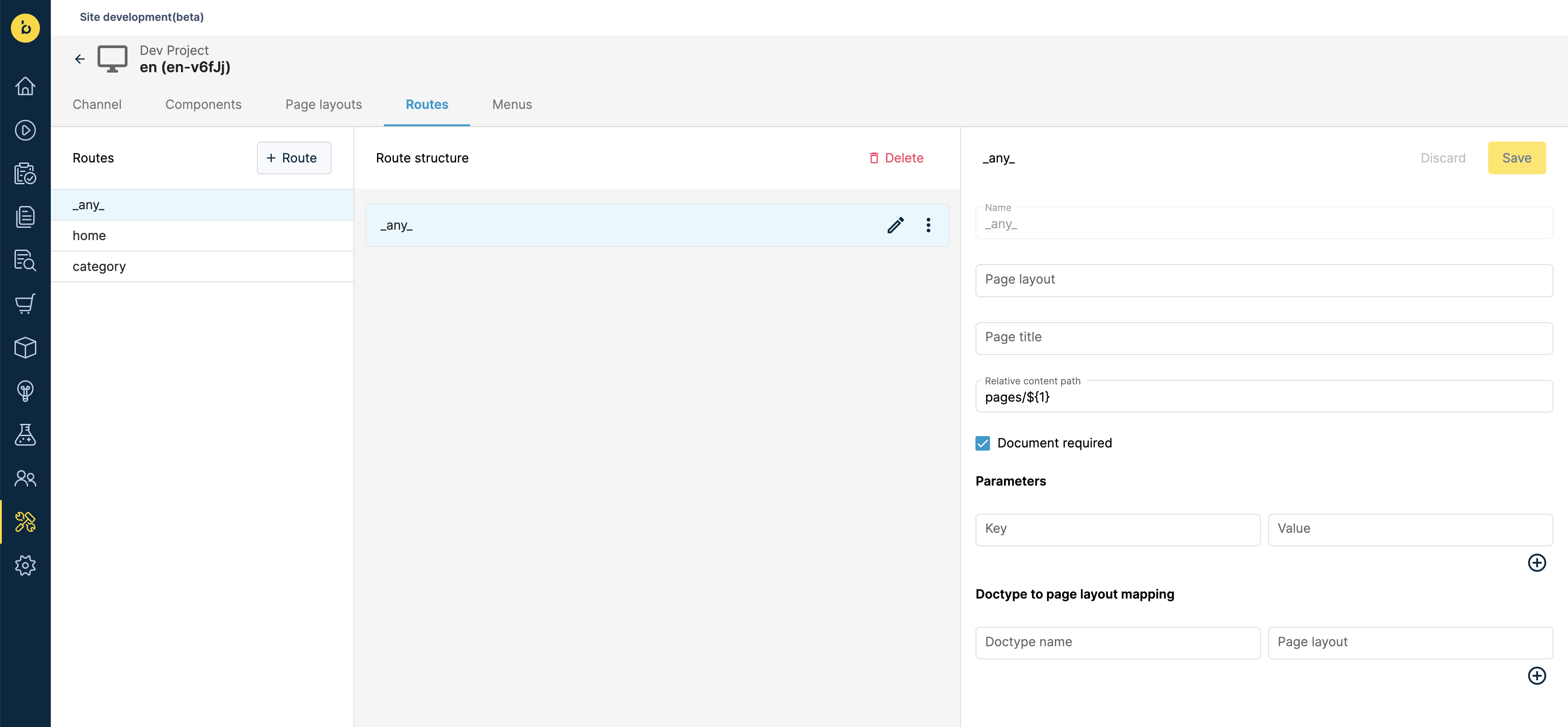
A wildcard route is very useful due to its universal character. Setting relative content path to pages/${1} allows you to fetch any page represented by a document placed at the root of the /pages directory. Therefore, you will be able to reuse it for pages with simple paths such as /login, /about, /contact, /whatever.
Category routes example
To create a category route from scratch:
- navigate to the Site Development app,
- click the Routes tab,
- click the + Route button,
- set your route's name to
category, - set your route's relative content path to
pages/category/indexto instruct Bloomreach that whenever some user visits the/categorypath in the Storefront, thepages/category/indexdocument should be fetched. - once done, hit the yellow Save button in the top right corner.
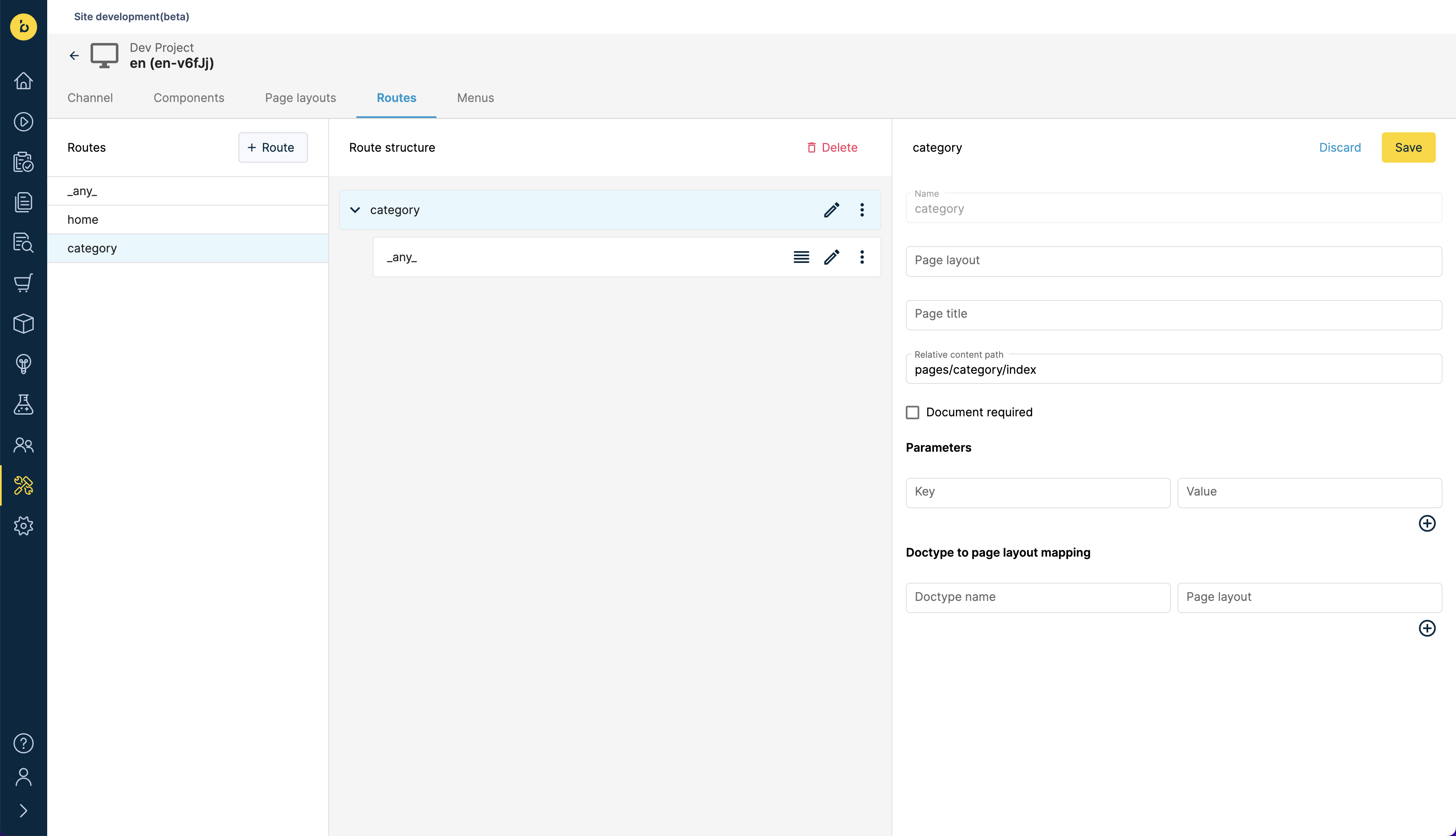
To use the pages/category/index document for all of your Product Listing pages, you will need a nested wildcard route:
- move your mouse over the three dots of your newly-created
categoryroute and click the Add route button, - set your route's name to
_any_, - set your route's relative content path to
pages/category/index, - once done, hit the yellow Save button in the top right corner.
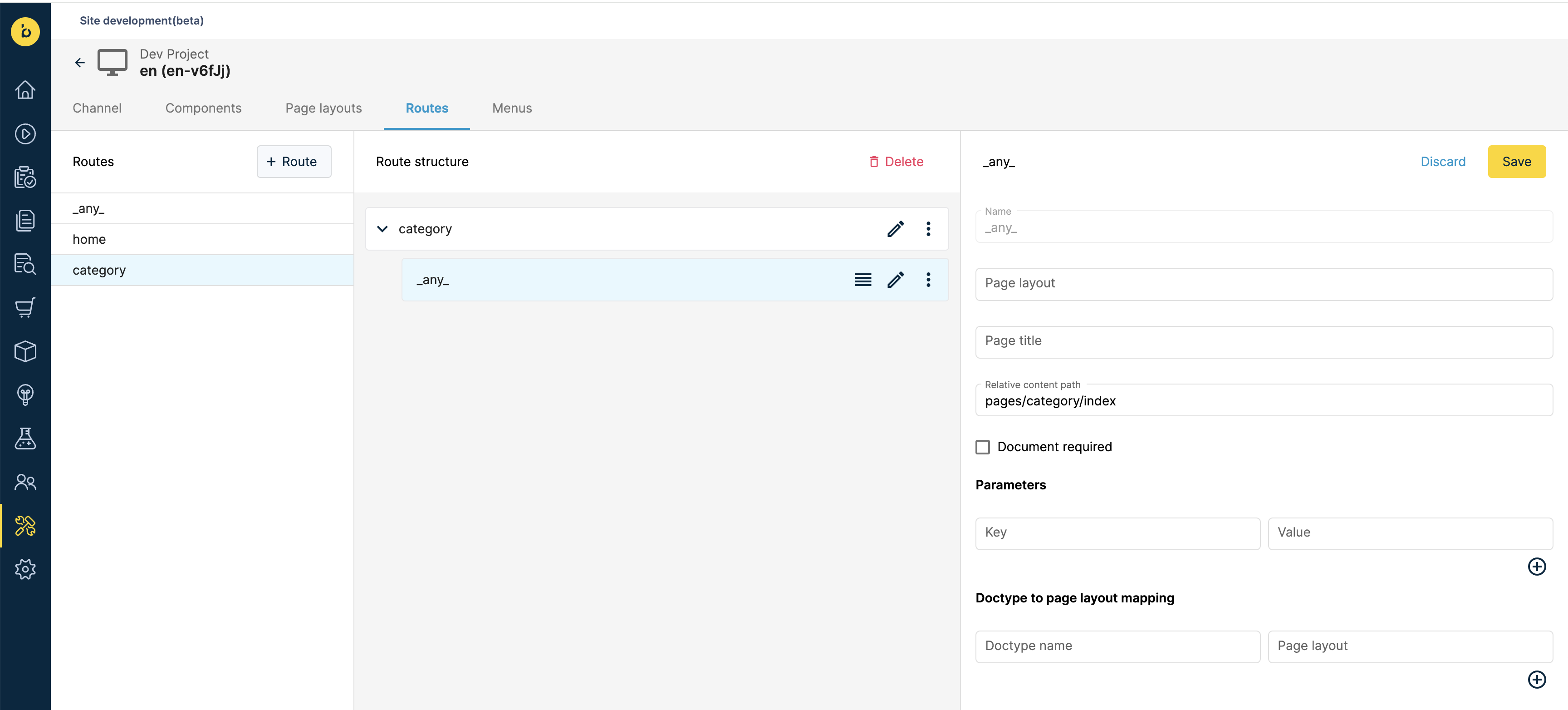
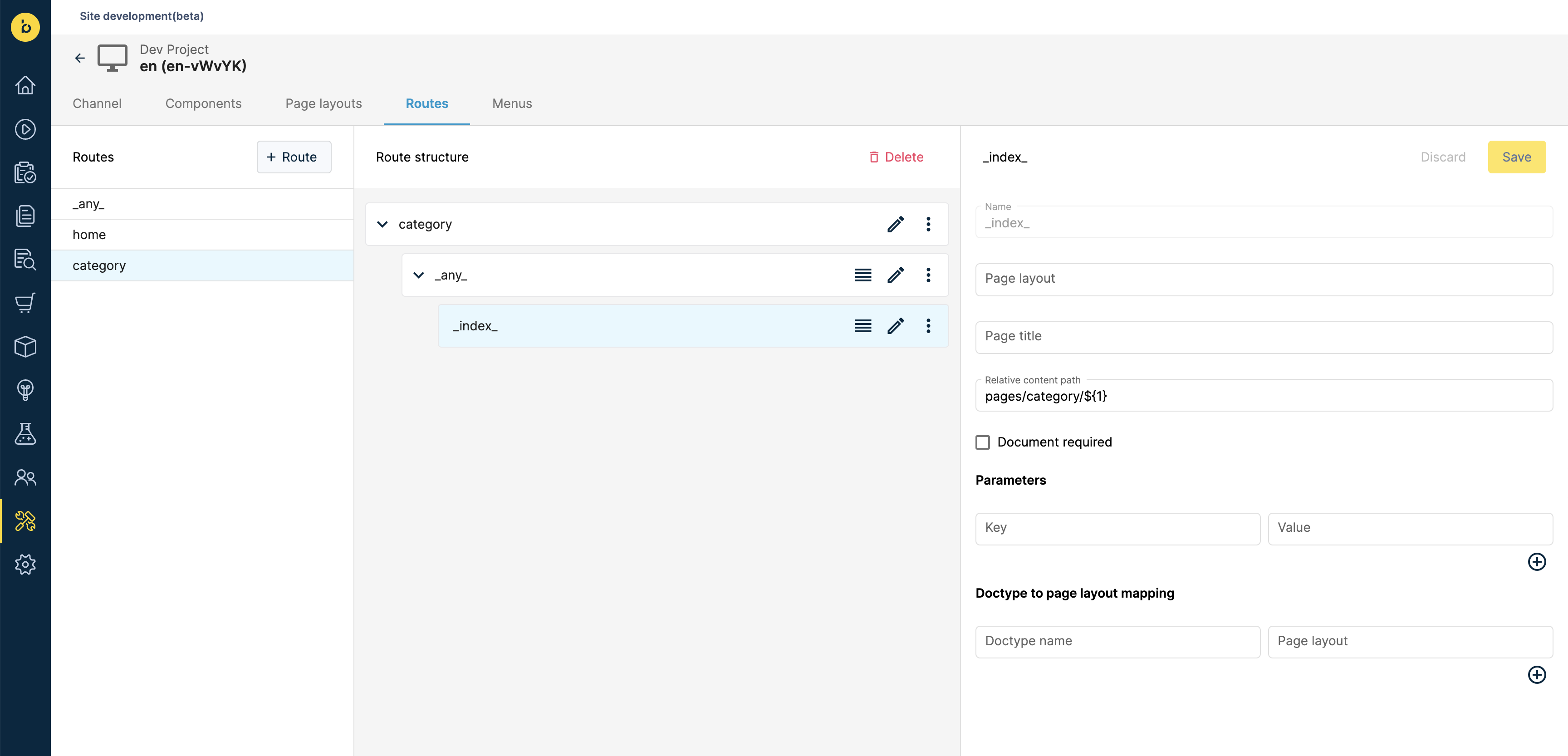
To use different documents for different Category pages and only use pages/category/index as a fallback (in case no Bloomreach Content document for a Storefront page is defined), you will need a nested index route:
- move your mouse over the three dots of your newly-created nested
_any_route and click the Add route button, - set your route's name to
_index_, - set your route's relative content path to
pages/category/${1}, - once done, hit the yellow Save button in the top right corner.
Builder.io provides a built-in page resolution mechanism called Targeting. However, additional configuration is required in the Storefront to ensure it can successfully fetch page entries from Builder.io. There are two callbacks responsible for matching Storefront paths with CMS content entries:
resolvePages()resolveFallbackPage()
They can be defined in the unified configuration of the integration's API Client. Both can be asynchronous, which is useful if you want to maintain the mappings in the CMS, allowing content editors to manage them.
Page Fetching Flow
When the integration's getPage() method is called, it tries to fetch a page entry from Builder.io in the following steps:
Resolving a Page
First, the getPage() method calls resolvePages(), passing the API Client's context and request params as arguments. The returned value is a mapping between Storefront page paths (or patterns) and objects containing the necessary data to fetch the appropriate CMS page entry:
export const config = {
  configuration: {
    unified: {
      resolvePages: () => Promise.resolve({
        '/category{/*slug}': {
          type: 'sections',
          model: [
            { name: 'components-top', key: "componentsTop" },
            { name: 'components-bottom', key: "componentsBottom" }
          ]
        },
        '/*slug': {
          type: 'page',
          model: 'page',
        }
      }),
      resolveFallbackPage: () => Promise.resolve({
        type: 'page',
        model: 'page',
      })
    }
  },
};
The necessary data includes:
- model: name of the model used to define the page.
- type: indicates whether the page was built using a single Page model or multiple Section models.
Based on the url passed as an argument, getPage() attempts to resolve a key-value pair from the map. If no match is found, it calls resolveFallbackPage() with the same arguments as resolvePages(). The resolved object will be used to fetch content from Builder.io in the next steps.
Fetching a page of type "page"
Suppose the following object was resolved in step one:
const resolvedPage = {
  type: 'page',
  model: 'page',
};
As a result, getPage() fetches a single Builder.io entry:
- created from a page model with ID
page, - with Targeting matching the url received by getPage() as an argument.
The fetched object is returned to the Storefront as-is.
Fetching a page of type "sections"
Suppose the following object was resolved in step one:
const resolvedPage = {
  type: 'sections',
  model: [
    { name: 'components-top', key: "componentsTop" },
    { name: 'components-bottom', key: "componentsBottom" }
  ]
}
As a result, getPage() fetches all Builder.io entries:
- created from section models with IDs being either
components-toporcomponents-bottom, - with Targeting matching the url received by getPage() as an argument.
The fetched components-top and components-bottom entries are merged into a single page object which will be returned to the Storefront.
const page = {
  componentsTop: {
    /** components-top entry content */
  },
  componentsBottom: {
    /** components-bottom entry content */
  }
}
One-to-One path mapping
Suppose you've created a CMS entry for a Product Listing page using a model with ID page. Now you want the entry to be fetched whenever users visit the /category/shoes path in the Storefront. For this, you need to define a one-to-one URL Path targeting attribute in Builder:
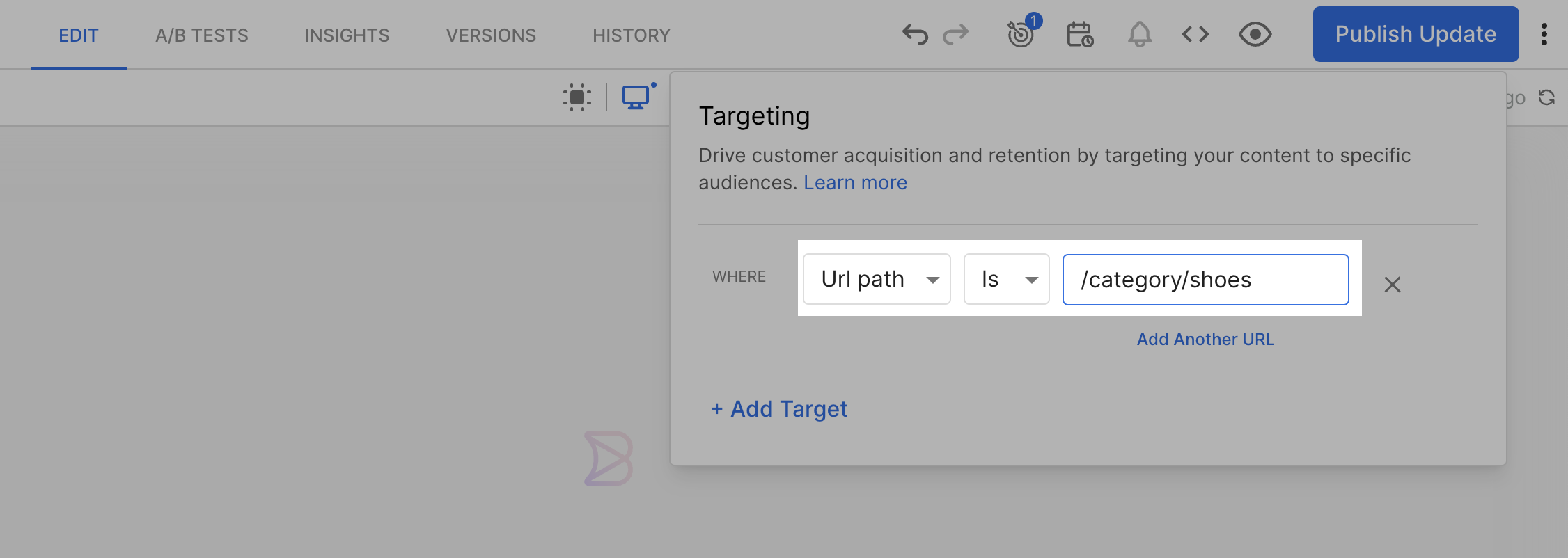
and a corresponding one-to-one mapping in resolvePages():
export const config = {
  configuration: {
    unified: {
      resolvePages: (context, params) => ({
        "/category/shoes": {
          type: "page",
          model: "page",
        },
      })
    },
  },
};
Many-to-One path mapping
Suppose you've got the same CMS entry for a Product Listing page. This time, you want it to be fetched whenever users visit a certain group of paths in the Storefront. For this, you need to define a many-to-one URL Path targeting attribute in Builder:
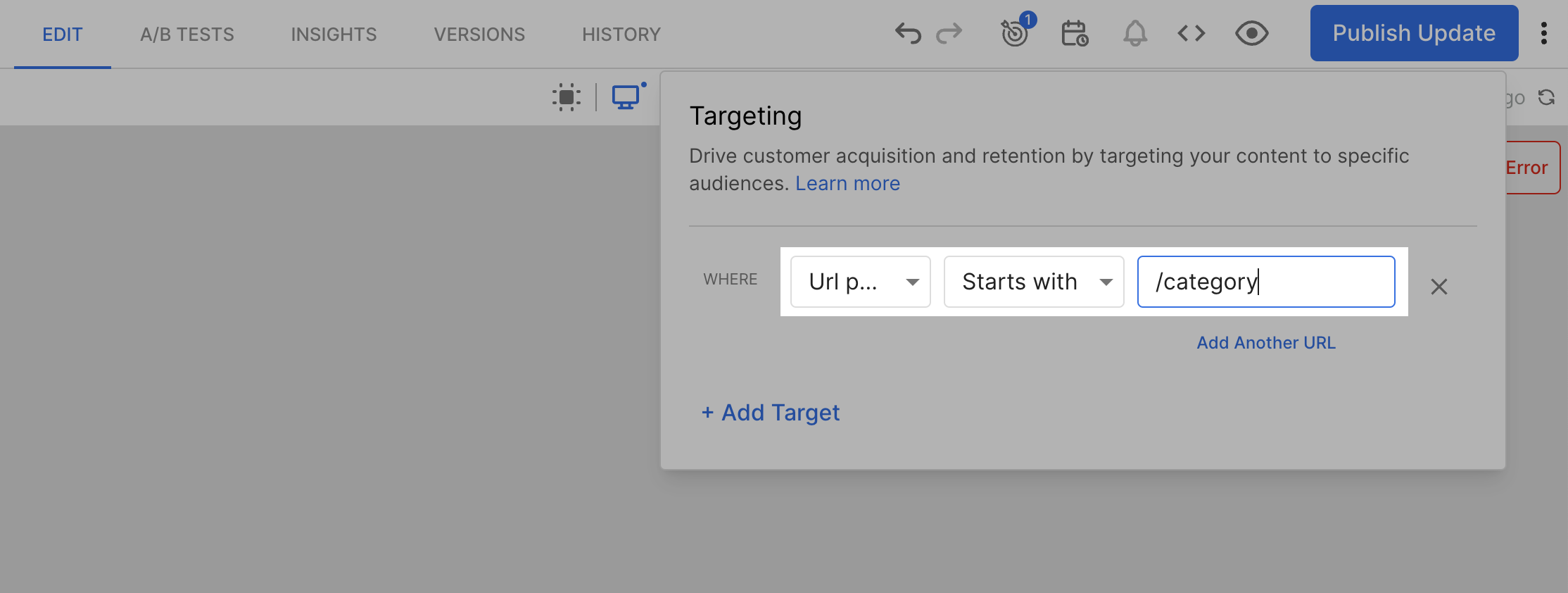
and a corresponding many-to-one mapping in resolvePages():
export const config = {
  configuration: {
    unified: {
      resolvePages: (context, params) => ({
        "/category/*slug": {
          type: "page",
          model: "page",
        },
      })
    },
  },
};
Internally, we use the path-to-regexp library to resolve Storefront paths and patterns. Refer to its documentation to explore available notation options.
If some Storefront path falls into the /category/*slug pattern but you would like to fetch a different CMS page entry for it:
- define a one-to-one URL Path targeting attribute for that entry,
- add a one-to-one mapping in resolvePages(), on top of the many-to-one mapping
export const config = {
  configuration: {
    unified: {
      resolvePages: (context, params) => ({
        "/category/shoes": {
          type: "page",
          model: "shoes-page",
        },
        "/category/*slug": {
          type: "page",
          model: "page",
        },
      })
    }
  }
}
Mappings order
When defining multiple mappings, ensure that the most specific paths appear first, followed by more general patterns. This prevents more general patterns from overshadowing specific ones.
Correct Example ✅
export const config = {
  configuration: {
    unified: {
      resolvePages: (context, params) => ({
        "/category/shoes/nike": {
          type: "page",
          model: "nike-page",
        },
        "/category/*slug": {
          type: "page",
          model: "page",
        },
      })
    }
  }
}
Incorrect Example ❌
export const config = {
  configuration: {
    unified: {
      resolvePages: (context, params) => ({
        "/category/*slug": {
          type: "page",
          model: "page",
        },
        /** This path will never be matched */
        "/category/shoes/nike": {
          type: "page",
          model: "nike-page",
        },
      })
    }
  }
}
In our Contentful integration, you can define two callbacks responsible for matching Storefront paths with CMS content entries:
resolvePages()resolveFallbackPage()
They can be defined in the unified configuration of the integration's API Client. Both can be asynchronous, which is useful if you want to maintain the mappings in the CMS, allowing content editors to manage them.
Page fetching flow
When the integration's getPage() method is called, it performs the following steps to fetch a page entry from Contentful:
Resolving a page
First, the getPage() method calls resolvePages(), passing the integration's API Client context and request params as arguments. The returned value is a map between Storefront page paths (or patterns) and objects containing the necessary data to fetch the appropriate CMS page entry:
export const config = {
  configuration: {
    unified: {
      resolvePages: () => ({
        "/category/shoes": {
          content_type: "categoryPage",
          url: "/category",
        },
      })
    },
  },
};
Based on the url received as an argument, getPage() resolves a single key-value pair from the map. The value will be used in subsequent steps to fetch a page entry from Contentful.
Fetching a page by exact url
In this step, getPage() uses the content_type from the page resolved in step one and the url received as an argument to fetch a page entry from Contentful. For example, when the url received as an argument equals /category/shoes and the page resolved in step one is the following:
const resolvedPage = {
  content_type: "categoryPage",
  url: "/category"
}
getPage() searches for a Contentful entry of type categoryPage and with url equal to /category/shoes. Keep in mind it does not yet use the url from the resolved page.
Fetching a page by resolved url
When the exact match strategy fails, getPage() uses both content_type and url from the page resolved in step one.
Fetching a fallback page
If fetching the resolved page fails, getPage() attempts to fetch a page based on the object returned by resolveFallbackPage(). The callback receives the same arguments as resolvePages() but has to return a single object containing the necessary data to fetch the fallback CMS page entry. Obviously, the fallback page entry has to exist in the CMS. If it does not, the getPage() request fails.
export const config = {
  configuration: {
    unified: {
      resolveFallbackPage: () => ({
        content_type: "page",
        url: "/fallback-page"
      }),
    }
  }
}
One-to-One path mapping
Suppose you've created a CMS entry for a Product Listing page. You've used the categoryPage Content Type and set the url field to /category. Now you want the entry to be fetched whenever users visit the /category/shoes path in the Storefront. For this you need to define a one-to-one relationship:
export const config = {
  configuration: {
    unified: {
      resolvePages: () => ({
        "/category/shoes": {
          content_type: "categoryPage",
          url: "/category",
        },
      })
    },
  },
};
Many-to-One path mapping
Suppose you've got the same CMS entry for a Product Listing page with url set to /category. Now you want it to be fetched whenever users visit a certain group of paths in the Storefront. For this, you need to define a many-to-one relationship using a pattern (/category/*slug) instead of a specific path:
export const config = {
  configuration: {
    unified: {
      resolvePages: () => ({
        "/category/*slug": {
          content_type: "categoryPage",
          url: "/category",
        },
      })
    }
  }
}
Internally, we use the path-to-regexp library to resolve Storefront paths and patterns. Refer to its documentation to explore available notation options.
If some Storefront paths fall into the category/*slug pattern but you would like to fetch different CMS page entries for them, you can still leverage the exact page match strategy. For example, if you define a CMS page entry with url equal to /category/shoes, the Storefront will fetch it whenever users visit the /category/shoes path. The url from the category/*slug mapping will be ignored.
Mappings order
When defining multiple mappings, ensure that the most specific paths appear first, followed by more general patterns. This prevents more general patterns from overshadowing specific ones.
Correct Example ✅
export const config = {
  configuration: {
    unified: {
      resolvePages: () => ({
        "/category/shoes/nike": {
          content_type: "categoryPage",
          url: "/category/shoes",
        },
        "/category/*slug": {
          content_type: "categoryPage",
          url: "/category",
        },
      })
    }
  }
}
Incorrect Example ❌
export const config = {
  configuration: {
    unified: {
      resolvePages: () => ({
        "/category/*slug": {
          content_type: "categoryPage",
          url: "/category",
        },
        /** This path will never be matched */
        "/category/shoes/nike": {
          content_type: "categoryPage",
          url: "/category/shoes",
        },
      })
    }
  }
}
In our Contentstack integration, you can define two callbacks responsible for matching Storefront paths with CMS content entries:
resolvePages()resolveFallbackPage()
They can be defined in the unified configuration of the integration's API Client. Both can be asynchronous, which is useful if you want to maintain the mappings in the CMS, allowing content editors to manage them.
Page fetching flow
When the integration's getPage() method is called, it tries to fetch a page entry from Contentstack in the following steps:
Resolving a page
First, the getPage() method calls resolvePages(), passing the integration's API Client context and request params as arguments. The returned value is a map between Storefront page paths (or patterns) and objects containing the necessary data to fetch the appropriate CMS page entry:
export const config = {
  configuration: {
    unified: {
      resolvePages: (context, params) => ({
        "/category/shoes": {
          type: "category_page",
          url: "/category",
        },
      })
    },
  },
};
Based on the url received as an argument, getPage() resolves a single key-value pair from the map. The value will be used in subsequent steps to fetch a page entry from Contentstack.
Fetching a page by exact url
In this step, getPage() uses the content_type from the page resolved in step one and the url received as an argument to fetch a page entry from Contentstack. For example, when the url received as an argument equals /category/shoes and the page resolved in step one is the following:
const resolvedPage = {
  type: "category_page",
  url: "/category",
}
getPage() searches for a Contentstack entry of type category_page and with url equal to /category/shoes. Keep in mind it does not yet use the url from the resolved page.
Fetching a page by resolved url
When the exact match strategy fails, getPage() uses both type and url from the page resolved in step one.
Fetching a fallback page
If fetching the resolved page fails, getPage() attempts to fetch a page based on the object returned by resolveFallbackPage(). The callback receives the same arguments as resolvePages() but has to return a single object containing the necessary data to fetch the fallback CMS page entry. Obviously, the fallback page entry has to exist in the CMS. If it does not, the getPage() request fails.
export const config = {
  configuration: {
    unified: {
      resolveFallbackPage: (context, params) => ({
        type: "page",
        url: "/fallback-page"
      }),
    }
  }
}
One-to-One path mapping
Suppose you've created a CMS entry for a Product Listing page. You've used the category_page Content Type and set the url field to /category. Now you want the entry to be fetched whenever users visit the /category/shoes path in the Storefront. For this you need to define a one-to-one relationship:
export const config = {
  configuration: {
    unified: {
      resolvePages: (context, params) => ({
        "/category/shoes": {
          type: "category_page",
          url: "/category",
          includeReference: ["components_top.items", "components_bottom.items"],
        },
      })
    },
  },
};
Many-to-One path mapping
Suppose you've got the same CMS entry for a Product Listing page with url set to /category. Now you want it to be fetched whenever users visit a certain group of paths in the Storefront. For this, you need to define a many-to-one relationship using a pattern (/category/*slug) instead of a specific path:
export const config = {
  configuration: {
    unified: {
      resolvePages: (context, params) => ({
        "/category/*slug": {
          type: "category_page",
          url: "/category",
          includeReference: ["components_top.items", "components_bottom.items"],
        },
      })
    }
  }
}
Internally, we use the path-to-regexp library to resolve Storefront paths and patterns. Refer to its documentation to explore available notation options.
If some Storefront paths fall into the /category/*slug pattern but you would like to fetch different CMS page entries for them, you can still leverage the exact page match strategy. For example, if you define a CMS page entry with url equal to /category/shoes, the Storefront will fetch it whenever users visit the /category/shoes path. The url from the /category/*slug mapping will be ignored.
Mappings order
When defining multiple mappings, ensure that the most specific paths appear first, followed by more general patterns. This prevents more general patterns from overshadowing specific ones.
Correct Example ✅
export const config = {
  configuration: {
    unified: {
      resolvePages: (context, params) => ({
        "/category/shoes/nike": {
          type: "category_page",
          url: "/category/shoes",
        },
        "/category/*slug": {
          type: "category_page",
          url: "/category",
        },
      })
    }
  }
}
Incorrect Example ❌
export const config = {
  configuration: {
    unified: {
      resolvePages: (context, params) => ({
        "/category/*slug": {
          type: "category_page",
          url: "/category",
        },
        /** This path will never be matched */
        "/category/shoes/nike": {
          type: "category_page",
          url: "/category/shoes",
        },
      })
    }
  }
}
Live Preview
When you want to preview a CMS page entry that's part of a many-to-one mapping, you might be unsure what url to use for the preview. Let's look at an example. With the following resolvePages(), all Storefront pages with paths matching the /product/*slug pattern will fetch the /product page from Contentstack:
export const config = {
  configuration: {
    unified: {
      resolvePages: (context, params) => ({
        "/product/*slug": {
          type: "product_page",
          url: "/product",
        },
      })
    }
  }
}
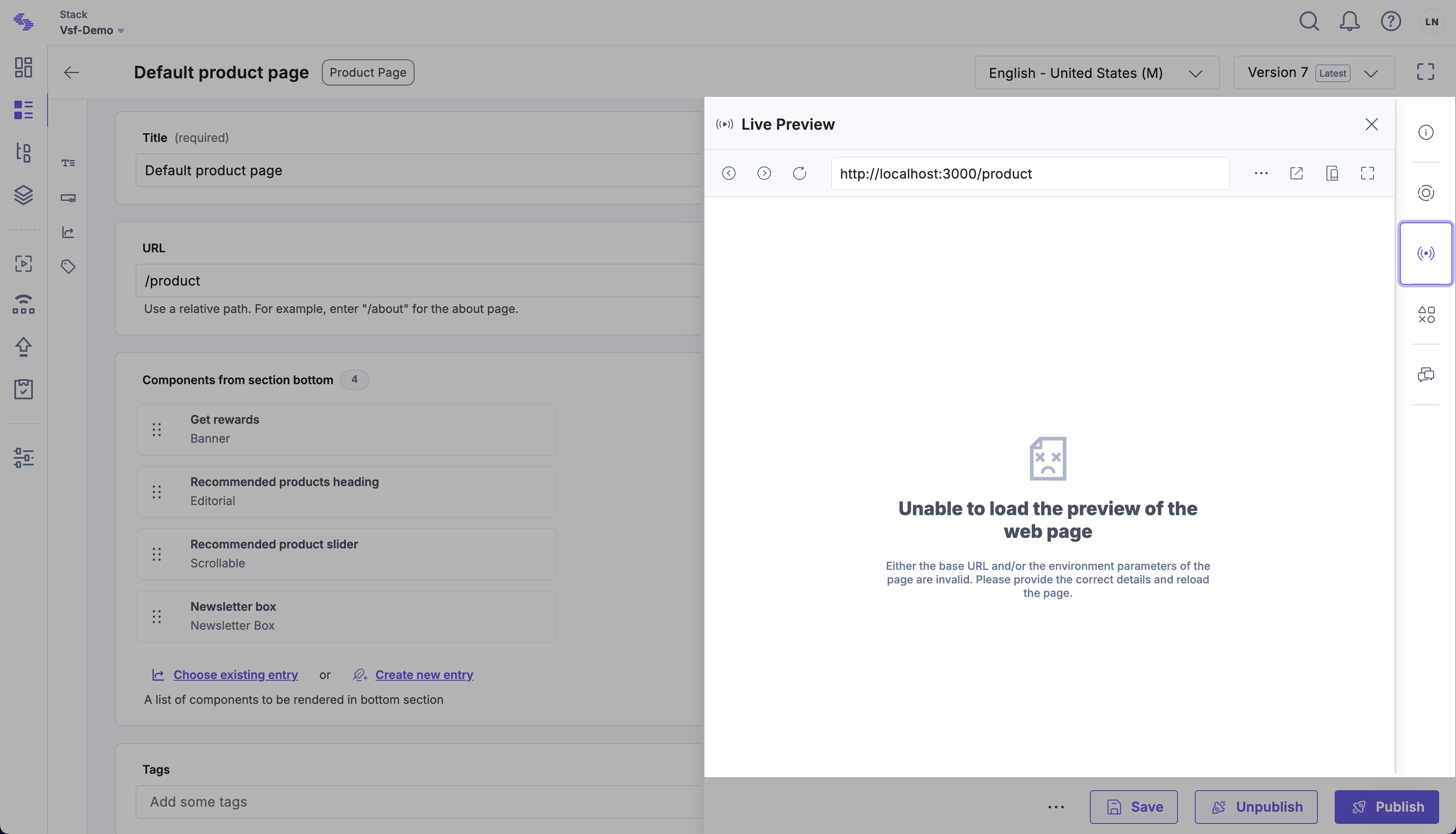
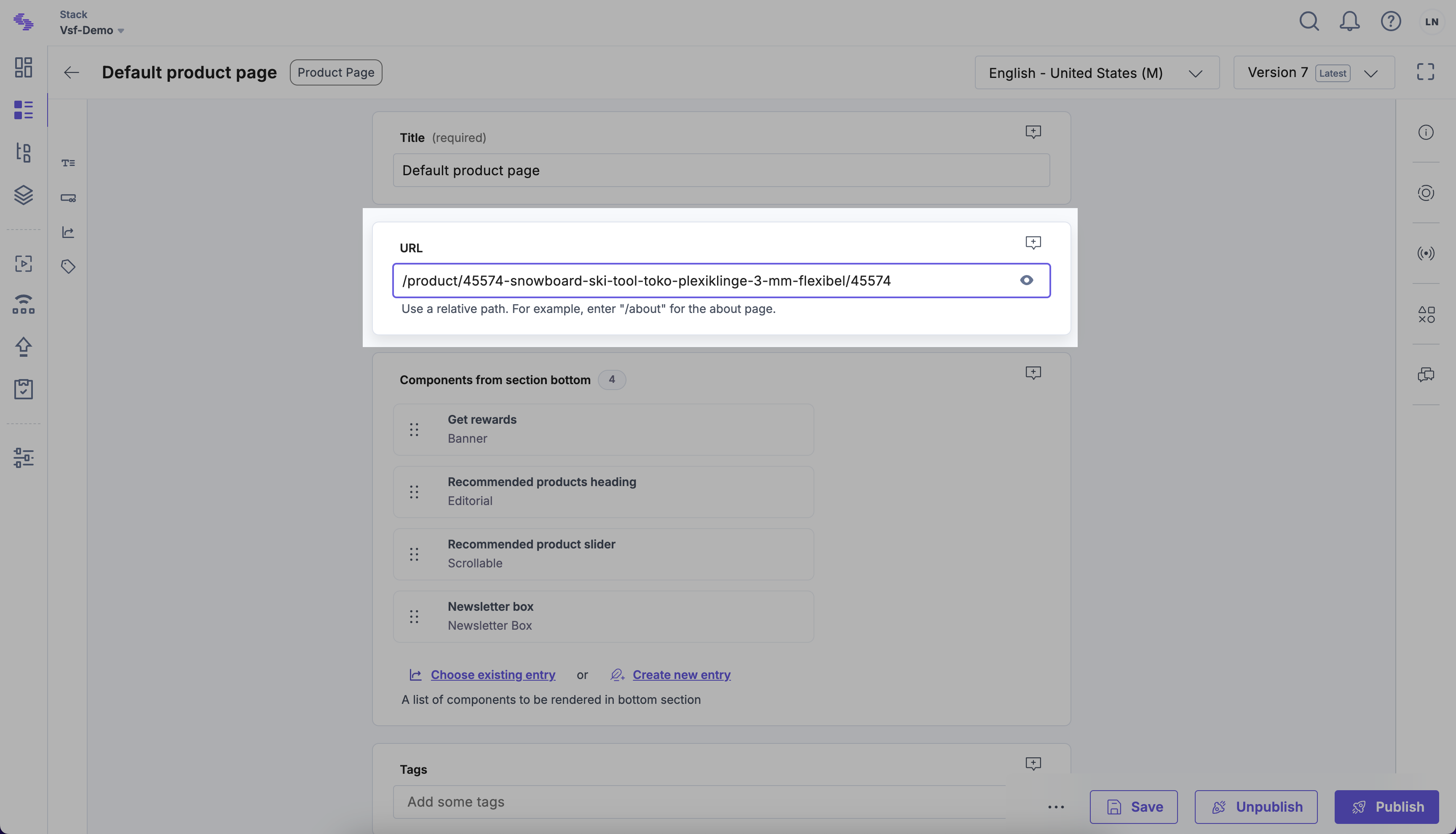
When you try to use Live Preview for an entry from that group, Contentstack will load <base_url>/<page_url> URL (in this case http://localhost:3000/product). However, such a page might not exist in the Storefront.
To mitigate that, you can manually change the URL in the Live Preview window to a URL of an existing Product Details page (for instance http://localhost:3000/product/45574-snowboard-ski-tool-toko-plexiklinge-3-mm-flexibel/45574).
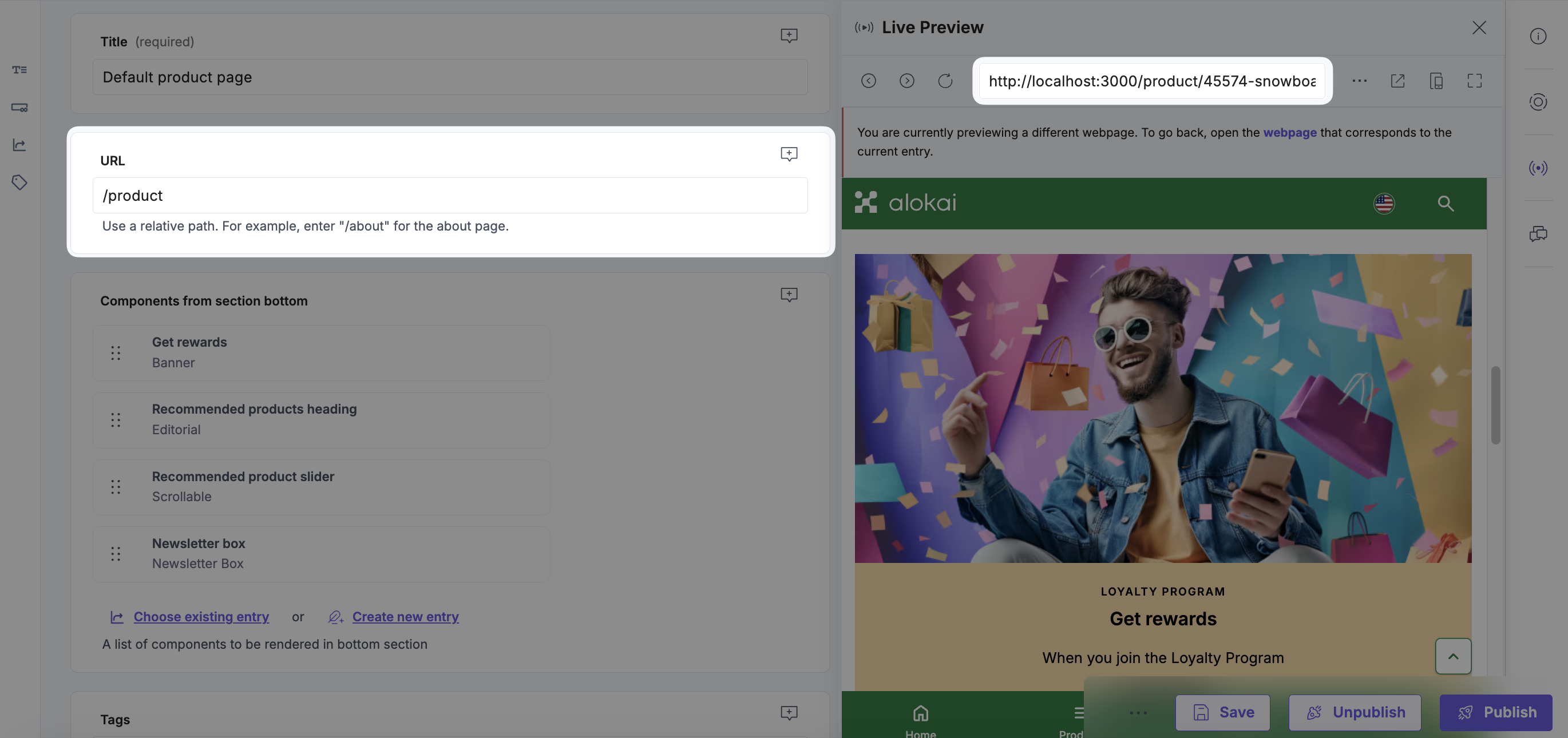
Alternatively you can update the entry's URL field as well as the mapping returned by resolvePages().
export const config = {
  configuration: {
    unified: {
      resolvePages: (context, params) => ({
        "/product/*slug": {
          type: "product_page",
          url: "/product/45574-snowboard-ski-tool-toko-plexiklinge-3-mm-flexibel/45574",
        },
      })
    }
  }
}
In our SmartEdit integration, you can define two callbacks responsible for matching Storefront paths with CMS content entries:
resolvePages()resolveFallbackPage()
They can be defined in the unified configuration of the integration's API Client. Both can be asynchronous, which is useful if you want to maintain the mappings in the CMS, allowing content editors to manage them.
Page fetching flow
When the integration's getPage() method is called, it tries to fetch a page from SmartEdit in the following steps:
Fetching a page by exact path or preview token
First, getPage() attempts to fetch a page from SmartEdit using the received path argument or - when present - the received x-cms-ticket-id header.
Fetching a resolved page
When step one fails, getPage() method calls resolvePages(), passing the integration's API Client context and request params as arguments. The returned value is a map between Storefront page paths (or patterns) and objects containing the necessary data to fetch the appropriate CMS page:
export const config = {
  configuration: {
    unified: {
      resolvePages: (context, params) => ({
        "/category/shoes": {
          pageLabelOrId: "category",
        },
      })
    },
  },
};
Based on the path received as an argument, getPage() resolves a single key-value pair from the map. The pageLabelOrId from the value is used to fetch a page from SmartEdit.
Fetching a fallback page
If fetching the resolved page fails, getPage() attempts to fetch a page based on the object returned by resolveFallbackPage(). The callback receives the same arguments as resolvePages() but has to return a single object containing the necessary data to fetch the fallback CMS page. Obviously, the fallback page has to exist in the SmartEdit. If it does not, the getPage() request fails.
export const config = {
  configuration: {
    unified: {
      resolveFallbackPage: (context, params) => ({
        pageLabelOrId: "fallback",
      }),
    }
  }
}
One-to-One path mapping
Suppose you've created a Product Listing page in the CMS and set its label to category. Now you want the page to be fetched whenever users visit the /category/shoes path in the Storefront. For this you need to define a one-to-one relationship:
export const config = {
  configuration: {
    unified: {
      resolvePages: (context, params) => ({
        "/category/shoes": {
          pageLabelOrId: "category",
        },
      })
    },
  },
};
Many-to-One path mapping
Suppose you've got the same Product Listing page in the CMS with label set to category. Now you want it to be fetched whenever users visit a certain group of paths in the Storefront. For this, you need to define a many-to-one relationship using a pattern (/category/*slug) instead of a specific path:
export const config = {
  configuration: {
    unified: {
      resolvePages: (context, params) => ({
        "/category{/*slug}": {
          pageLabelOrId: "category",
        },
      })
    }
  }
}
Internally, we use the path-to-regexp library to resolve Storefront paths and patterns. Refer to its documentation to explore available notation options.
If some Storefront paths fall into the /category/*slug pattern but you would like to fetch different CMS page entries for them, you can still leverage the exact page match strategy. For example, if you define a CMS page with label equal to category/shoes, the Storefront will fetch it whenever users visit the /category/shoes path. The label from the /category/*slug mapping will be ignored.
Mappings order
When defining multiple mappings, ensure that the most specific paths appear first, followed by more general patterns. This prevents more general patterns from overshadowing specific ones.
Correct Example ✅
export const config = {
  configuration: {
    unified: {
      resolvePages: (context, params) => ({
        "/category/shoes/nike": {
          pageLabelOrId: "category/shoes",
        },
        "/category{/*slug}": {
          pageLabelOrId: "category",
        },
      })
    }
  }
}
Incorrect Example ❌
export const config = {
  configuration: {
    unified: {
      resolvePages: (context, params) => ({
        "/category{/*slug}": {
          pageLabelOrId: "category",
        },
        /** This path will never be matched */
        "/category/shoes/nike": {
          pageLabelOrId: "category/shoes",
        },
      })
    }
  }
}
In our Storyblok integration, you can define two callbacks responsible for matching Storefront paths with CMS content entries:
resolvePages()resolveFallbackPage()
They can be defined in the unified configuration of the integration's API Client. Both can be asynchronous, which is useful if you want to maintain the mappings in the CMS, allowing content editors to manage them.
Page fetching flow
When the integration's getPage() method is called, it tries to fetch a page from Storyblok in the following steps:
Fetching a page by exact path
First, getPage() attempts to fetch a page from Storyblok using the received path argument.
Fetching a resolved page
When step one fails, getPage() method calls resolvePages(), passing the integration's API Client context as argument. The returned value is a map between Storefront page paths (or patterns) and objects containing the necessary data to fetch the appropriate CMS page:
export const config = {
  configuration: {
    unified: {
      resolvePages: (context) => ({
        "/category/shoes": {
          path: "category",
        },
      })
    },
  },
};
Based on the path received as an argument, getPage() resolves a single key-value pair from the map. The value is used to fetch a page from Storyblok.
Fetching a fallback page
If fetching the resolved page fails, getPage() attempts to fetch a page based on the object returned by resolveFallbackPage(). The callback receives the same arguments as resolvePages() but has to return a single object containing the necessary data to fetch the fallback CMS page. Obviously, the fallback page has to exist in Storyblok. If it does not, the getPage() request fails.
export const config = {
  configuration: {
    unified: {
      resolveFallbackPage: (context) => ({
        path: "fallback",
      }),
    }
  }
}
One-to-One path mapping
Suppose you've created a Product Listing page in the CMS and set its slug to category. Now you want the page to be fetched whenever users visit the /category/shoes path in the Storefront. For this you need to define a one-to-one relationship:
export const config = {
  configuration: {
    unified: {
      resolvePages: (context) => ({
        "/category/shoes": {
          path: "category",
        },
      })
    },
  },
};
Many-to-One path mapping
Suppose you've got the same Product Listing page in the CMS with slug set to category. Now you want it to be fetched whenever users visit a certain group of paths in the Storefront. For this, you need to define a many-to-one relationship using a pattern (/category{/*slug}) instead of a specific path:
export const config = {
  configuration: {
    unified: {
      resolvePages: (context) => ({
        "/category{/*slug}": {
          path: "category",
        },
      })
    }
  }
}
Internally, we use the path-to-regexp library to resolve Storefront paths and patterns. Refer to its documentation to explore available notation options.
If some Storefront paths fall into the /category{/*slug} pattern but you would like to fetch different CMS page entries for them, you can still leverage the exact page match strategy. For example, if you define a CMS page in the category folder with slug equal to shoes, the Storefront will fetch it whenever users visit the /category/shoes path. The path from the /category{/*slug} mapping will be ignored.
Mappings order
When defining multiple mappings, ensure that the most specific paths appear first, followed by more general patterns. This prevents more general patterns from overshadowing specific ones.
Correct Example ✅
export const config = {
  configuration: {
    unified: {
      resolvePages: (context) => ({
        "/category/shoes/nike": {
          path: "category/shoes",
        },
        "/category{/*slug}": {
          path: "category",
        },
      })
    }
  }
}
Incorrect Example ❌
export const config = {
  configuration: {
    unified: {
      resolvePages: (context) => ({
        "/category{/*slug}": {
          path: "category",
        },
        /** This path will never be matched */
        "/category/shoes/nike": {
          path: "category/shoes",
        },
      })
    }
  }
}
Live Preview
When you want to preview a CMS page entry that's part of a many-to-one mapping, you might be unsure what URL to use for the preview. Let's look at an example. With the following resolvePages(), all Storefront pages with paths matching the /product{/*slug} pattern will fetch the /product story from Storyblok:
export const config = {
  configuration: {
    unified: {
      resolvePages: (context) => ({
        "/product{/*slug}": {
          path: "product"
        },
      })
    }
  }
}
When you try to open the story in the Visual Editor, Storyblok will load <base_url>/<story_slug> URL (in this case https://localhost:3000/product). However, such a page might not exist in the Storefront. To mitigate that, you can set the Real path of your story to a path of a Product Details page that exists in your Storefront (e.g. product/45574-snowboard-ski-tool-toko-plexiklinge-3-mm-flexibel/45574).
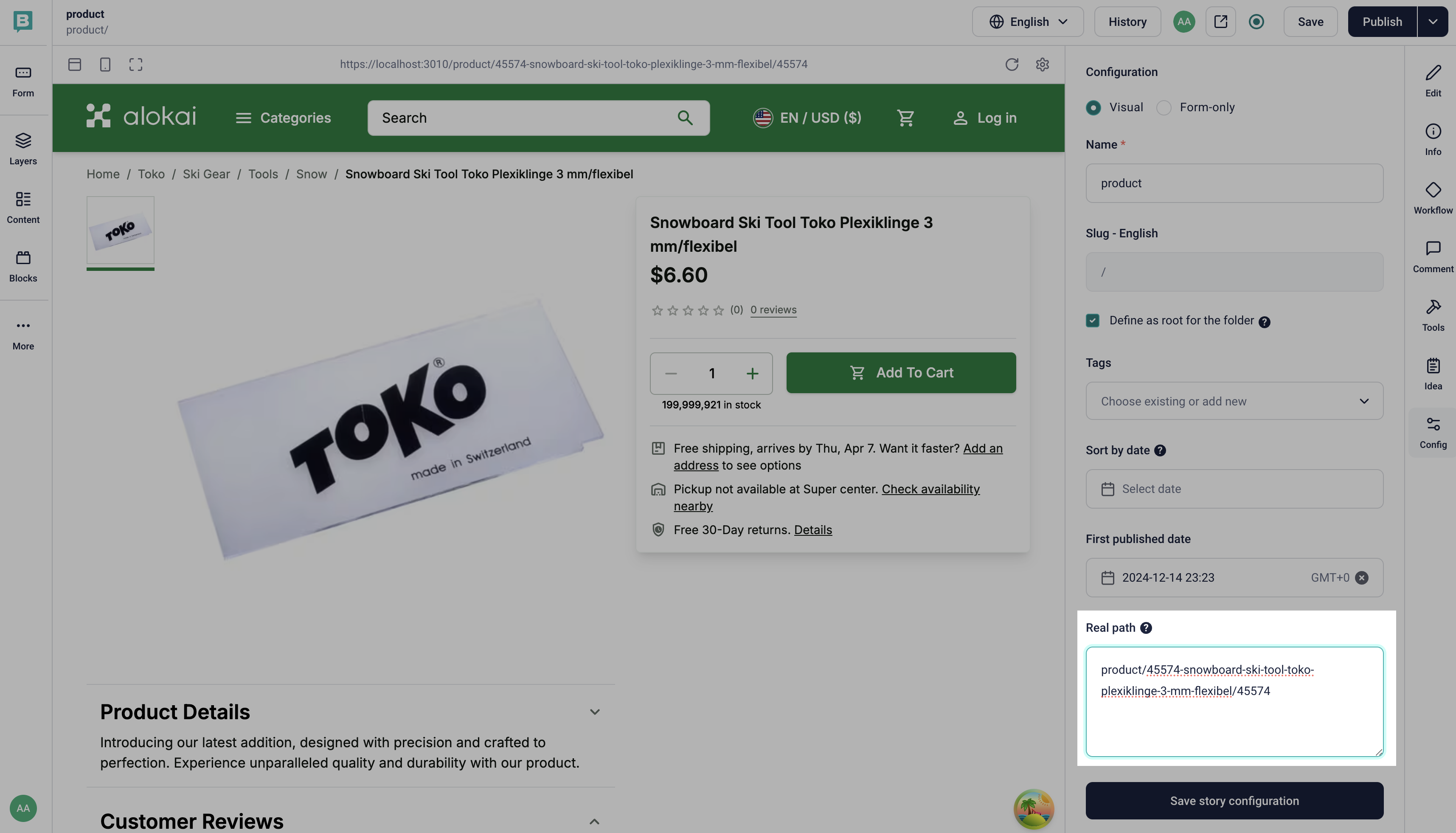
Alternatively you can set the story's slug to a path of a Product Details page that exists in your Storefront as well as the mapping returned by resolvePages().
export const config = {
  configuration: {
    unified: {
      resolvePages: (context) => ({
        "/product{/*slug}": {
          path: "product/45574-snowboard-ski-tool-toko-plexiklinge-3-mm-flexibel/45574"
        },
      })
    }
  }
}
Read also
Now you know how to introduce complex relationships between your Storefront paths and CMS page entries. Read the other guides to learn even more about building amazing things with our CMS integrations.